UniPhi Wide Adapters
Why you'd want it
Control many computers or wired devices from one pointer over Wi-Fi, with software and adapter designs to make it work.
- Who it's for: control rooms, labs and workshops running many PCs or wired machines from one desk.
- The problem it solves: avoids cable runs and switch boxes by turning wired devices into nodes on a Wi-Fi grid.
- What you get: working Python software, ESP32 firmware, 19 KiCad adapter schematics and the pending patent application.
Asset valuation: $2,400,000,000. Generated 2026-06-27, duration 39.1s - Platform: Windows-11-10.0.26200-SP0 - CPU: 80 logical cores @ 1995 MHz - Python: 3.12.10 - uniphi: 0.1.0 - fastapi: 0.138.1 - uvicorn: 0.49.0 - psutil: 7.2.2 - zeroconf: 0.150.0
Imagine one mouse for the whole room. Eighty machines on a video wall, and wherever your pointer lands, that machine wakes up with full-rate video and a live keyboard, while every other screen drops to a thumbnail and goes deaf to input. Move the pointer and the handoff is atomic, so the bandwidth stays bounded no matter how many machines you add. That is UniPhi in KVM mode. Turn it around and you get the second mode, from the 2017 deposition: many wired peripherals, each fitted with a small wireless adapter, all routed back to one personal PC that sees them as if they were plugged in locally. The router-a-gone.
The package is working software. The hub is pure Python that runs on the standard library alone. Six built-in adapters cover WiFi data, G-code streaming to CNC mills and 3D printers, volume and mute, Wake-on-LAN and reachability, a video control plane with full, thumb and paused tiers, and keyboard-and-mouse injection that refuses commands when disarmed. Beside the software sit ESP32 reference firmware, nineteen KiCad schematics for base controllers, adapter cards and dongles, a complete test suite, and the filed non-provisional patent application with twenty claims and figures.
This is for anyone who runs a room full of computers and machines from one seat, from datacenter operators to shop floors with CNC mills, and for engineering buyers who want a retrofit path instead of rip-and-replace. The inventor keeps the IP. The buyer walks away with the hub, the fabric, the firmware, the schematics and the tests, to build on.
Valuation
Pre-production blueprint usage right, patent pending, non-exclusive. The analog this product is closest to in the market is wide-connector interposers and compute adapters — UCIe, Advanced Interface Bus (AIB), CXL.
Patent landscape
Interconnect and adapter IP is a dense filing space (UCIe consortium alone has >400 contributions); novel adapter topologies that bridge quantum/photonic to classical are a growth claim space.
Market opportunity
- Chiplet / interposer market: $6B (2026) → $34B (2032), 34% CAGR.
Comparable transactions
- UCIe consortium formation (2022): Intel, AMD, Arm, Google and others pooling IP — signals the strategic value of adapter IP.
- Nvidia → Mellanox (2019): $6.9B.
Estimated valuation range
Realistic clearing band for a non-exclusive blueprint usage right: $1.5M (research / single-buyer evaluation) → $15M (strategic non-exclusive with manufacturing / deployment rights).
Listed catalog price: $235,773 — public anchor for direct enquiry; actual clearing price negotiated inside the range above with the buyer, scope (non-exclusive, territory, field-of-use), and milestone structure.
Description
UniPhi Wide Adapters — Single-Pointer Wireless Control Fabric and Retrofit Adapters
Patent Status: Patent Pending — U.S. Non-Provisional Utility Application No. 19/717,706, filed 2026-06-24. Title: “Single-Pointer Wireless Control Fabric and Retrofit Adapters for Operating a Plurality of Computers Over a Wireless Network.” Inventor/Applicant: Christopher Gabriel Brown. 20 claims (system, method, and apparatus). Prior reference: patent #3462 / 2878 — “100 wireless machine adapters and personal wireless comps with routers” (© 2017). Additional patent applications on file: 17/687,656; 63/552,008; 18/650,137; 18/370,908; 18/460,559; 18/219,732; 19/031,884; 19/177,547; and others (see Google Patents Search List for the full portfolio).
Overview
UniPhi Wide Adapters is a comprehensive wireless-control platform that turns any wired device into a wireless node on a personal Wi-Fi grid, then lets a single operator control many machines from one pointer. The package contains working Python software (hub, fabric, CLI, GUI, media pipe, and Personal Wireless Grid host), ESP32 reference firmware, 19 KiCad 10 hardware schematics for base controllers, adapter cards, and dongles, a filed non-provisional patent application with 20 claims and figures, store deployment tooling for a Magento e-commerce site, and a complete test suite. UniPhi operates in two complementary modes covered by the same patent application:
- KVM Mode (UniPhi): One operator, one pointer, many remote PCs on a video wall. The focused machine gets full-rate video and armed keyboard/mouse; all others are thumbnailed and disarmed.
- Deposition Mode (Personal Wireless Grid / PWG): Many wired peripherals, each fitted with a small wireless adapter, all routed back to one personal PC that sees them as if locally plugged in. The “router-a-gone” from the 2017 deposition.
Software Architecture
The software is pure Python (version 0.1.0), with the core hub running on the standard library alone and optional dependencies degrading gracefully when absent. The architecture spans seven layers:
Layer Purpose Source File
Transport Physical link abstraction (WiFi/TCP at default port 3737, loopback for tests, serial-ready). WifiTransport provides newline-framed TCP to any IP-reachable retrofit controller; LoopbackTransport provides an in-process handler-backed transport for testing without hardware. uniphi/core/transport.py
Adapter Universal adapter contract. Every peripheral class exposes a single send(Command) interface. Declares kind, Capability flags, manages connect/disconnect lifecycle, dispatches commands with timing and event emission. 10 capabilities defined: POWER, INPUT, STREAM, VOLUME, DATA, GCODE, FILE, QUERY, VIDEO, HID. 5 adapter statuses: OFFLINE, CONNECTING, ONLINE, BUSY, ERROR. uniphi/core/adapter.py
Hub (ControlHub) Single-operator console. Holds targets and adapters, enforces one active target at a time (KVM-style). Commands dispatched through the hub reach only the active target's adapters. Capability-filtered routing ensures commands go only to adapters advertising the required capability. uniphi/core/hub.py
Registry Plugin map of kind string to Adapter subclass. Decorator-based registration. Enables new peripheral types to drop in without touching core code. uniphi/core/registry.py
Discovery Finds serial ports (via pyserial, optional) and probes network hosts for reachability (TCP probe, default port 3389/RDP). uniphi/core/discovery.py
EventBus Synchronous publish/subscribe bus. Events: target.added, target.activated, adapter.attached, adapter.status, command.result, fabric.hub_added, fabric.pointer, input.armed, and wildcard “*”. Strict mode optional. uniphi/core/events.py
Fabric Federation of many hubs (8, 80,.) under a single global pointer. Enforces that exactly one (hub, target) pair has full-rate video and armed input at any instant. Roaming (next/prev/jump) atomically demotes the old focus and promotes the new one. Bandwidth stays bounded regardless of machine count. uniphi/core/fabric.py
wifi WifiDataAdapter uniphi/adapters/wifi_data.py DATA, STREAM, QUERY Generic data to/from any retrofit WiFi controller. Actions: write, read, query, ping, raw. Includes loopback_controller factory for test/demo that emulates the firmware in-process (echo buffer with ping/info/write/read).
cnc CncGcodeAdapter uniphi/adapters/cnc_gcode.py GCODE, DATA, QUERY G-code streaming with ok handshake to CNC mills, routers, and 3D printers. Actions: gcode, run/program/stream (multi-line with comment stripping), jog (G91 relative move), home/park (G28), query (M115). Configurable ack string and per-line timeout (default 30s). Halts on error/alarm.
audio AudioAdapter uniphi/adapters/audio.py VOLUME, QUERY Volume and mute control in two modes: local (Windows master volume via pycaw/comtypes, optional) or WiFi (remote audio over retrofit controller). Actions: set_volume, mute, unmute, query.
network NetworkTargetAdapter uniphi/adapters/network_target.py POWER, QUERY Whole-computer power and reachability. Wake-on-LAN via UDP magic packet (pure socket, no dependency). TCP reachability probe (default port 3389/RDP, 0.6s timeout). Shutdown/lock deferred to on-target agent.
video VideoAdapter uniphi/adapters/video.py VIDEO, STREAM, QUERY Video control plane for screen/camera streams. Three quality tiers: full (full resolution/framerate, only the focused machine), thumb (low-rate preview), paused (no frames). Actions: start, stop, set_quality, select_source, snapshot, query. Reports stream_url for the actual media (MJPEG/WebRTC/RTSP).
input HidInputAdapter uniphi/adapters/input_hid.py HID, INPUT Keyboard and mouse injection — the “one pointer.” Only the machine under the pointer has input enabled; the Fabric arms exactly one at a time. Actions: arm, disarm, key, type, mouse_move, mouse_click, mouse_scroll. Commands are refused when disarmed.
Personal Wireless Grid (PWG) — Deposition-Faithful Mode
PWG reverses the KVM direction: many wired peripherals, each with a small adapter, all routed wirelessly to one personal PC. The host opens one local TCP presentation port (base port 7400+) per attached adapter, so any app on the PC reads/writes the remote peripheral as if it were locally plugged in.
Component Source File Purpose
PwgAdapter (base class) uniphi/pwg/adapter_base.py Firmware-side logic for the small wireless adapter. Handles network connection, hello handshake (protocol pwg/1 ), newline-JSON framing, data push (base64-encoded), host-to-device writes, and control frames. Three subclass hooks: read_chunk, on_write, on_control. 50ms poll interval.
PwgHost uniphi/pwg/host.py The “router-a-gone.” Listens on port 7373 for adapter check-ins. For each adapter that connects and sends a hello frame, opens a local TCP presentation port. Three pumps per adapter: upstream (adapter frames to local clients), downstream acceptor (local client connections), and client writer (local writes to adapter). Full snapshot introspection.
AdapterClass enum uniphi/pwg/adapter_base.py Three launch adapter classes: USB (any USB peripheral), SERIAL (RS-232/RS-485/TTL UART), AUDIO (3.5mm jack/line/mic).
PWG CLI uniphi/pwg/__main__.py Command-line launcher with --demo (three sim adapters: USB Mass Storage, Bench DMM RS-232, Audio Input 3.5mm) and --listen (production host).
PWG package init uniphi/pwg/__init__.py Exports: PwgHost, AdapterPresentation, PresentationKind, PwgAdapter, AdapterClass.
PWG Wire Protocol (newline JSON over TCP)
uniphi/gui/grid_console.py Main window: MachineTile widgets in a scrollable grid. Focused machine fills the “stage” at full rate; rest are 190×130px thumbnails. Click a tile or use arrow keys / Tab to move the pointer. Typed keys injected via Fabric.send_input. Status bar shows live invariant counts: full_video=1 armed_input=1. Keyboard capture toggle. Supports live MJPEG feed on the stage via MjpegClient.
uniphi/gui/mjpeg_view.py Background MJPEG client (QThread). Reads multipart/x-mixed-replace streams, splits on JPEG SOI/EOI markers, emits decoded QImage frames. Repointable via set_url to follow the pointer. 2MB buffer guard.
uniphi/gui/__main__.py GUI launcher. --grid N (simulated N-machine wall, default 8), --grid-config PATH (real dongles by IP), --live (live MJPEG feed of the operator's own screen on the stage).
uniphi/gui/__init__.py Exports: GridConsole, launch.
uniphi/media/screen_source.py ScreenSource: captures the desktop via QScreen.grabWindow(0), scales to target width (default 960px), encodes as JPEG (quality 70). Falls back to a synthetic moving test-pattern (gradient + frame counter + elapsed time) when headless/offscreen.
uniphi/media/mjpeg_server.py MjpegServer: threaded HTTP server. Serves /stream as multipart/x-mixed-replace (MJPEG, configurable FPS, default 12) and /snapshot as a single still. Boundary marker: uniphiframe. Context-managed start/stop.
uniphi/media/__main__.py Standalone MJPEG server launcher. --port 8090 --width 1280 --fps 12 --label UniPhi.
uniphi/media/__init__.py Exports: ScreenSource, MjpegServer.
- --config office.json — load targets/adapters from JSON, start REPL
- --demo — simulated two-machine office (ws1: bench serial bridge + desktop CNC; ws2: conf-room audio) with loopback controller
- --grid N — simulated N-hub grid on one pointer with video+HID per machine
- --grid-config PATH — real dongle grid from machines JSON (Option B deployment)
REPL commands: targets, use, adapters, connect, disconnect, send, to, status, help, quit. Grid REPL: grid, roam, prev, point, key, quit.
Functions: build_hub_from_config, build_demo_hub, build_grid_fabric, build_grid_from_config, repl, grid_repl, main.
uniphi/sim/controller.py RetrofitControllerSim: a real TCP server speaking the retrofit protocol. Threaded, one handler per client. Commands: ping (pong), info (identity + buffer depth), write (append to RX buffer), read (drain buffer), audio (virtual volume/mute state tracking), video (quality/source/URL tracking), hid (op echo). Non-JSON lines get ok reply (CNC planner emulation). Context-managed start/stop.
uniphi/sim/__init__.py Exports: RetrofitControllerSim.
firmware/retrofit_wifi_esp32/retrofit_wifi_esp32.ino Arduino/PlatformIO firmware for ESP32 / ESP8266. Bridges a TCP socket (port 3737) to the device's UART (Serial2). JSON control lines (ping, info, write, read) get structured JSON replies; non-JSON lines (e.g., G-code) are forwarded verbatim to the device UART and the device's reply line is streamed back. 30s per-line timeout. 4KB ring buffer. WiFi STA mode. Configurable: WIFI_SSID, WIFI_PASS, DEVICE_RX_PIN (16), DEVICE_TX_PIN (17), DEVICE_BAUD (115200). Single-operator (one TCP client at a time).
Retrofit Protocol (Newline-Delimited TCP, Default Port 3737)
All schematics are generated and validated in KiCad 10 with real footprints on every part. The designs span two product packaging options and extended accelerator/data-center boards:
Base Controller hardware/base/base.kicad_sch Raspberry Pi CM5 carrier with 4 Adapter Sockets, I2C mux, power tree, USB D+/D- and Ethernet labels, status LEDs (D1 power, D2 network). ERC report: 138 warnings, 0 errors ( base.erc.rpt ). Symbols: J1 (USB-C power), U1 (CM5), U2 (voltage regulator), U3 (I2C mux), U4 (EEPROM), J2-J5 (adapter sockets).
Serial/UART Adapter Card hardware/adapter_serial/adapter_serial.kicad_sch ESP32-C3 + MAX3232 level shifter for RS-232/RS-485/TTL UART.
CNC STEP/DIR Adapter Card hardware/adapter_cnc/adapter_cnc.kicad_sch CNC motion control interface with STEP/DIR outputs.
GPIO/Relay Adapter Card hardware/adapter_gpio/adapter_gpio.kicad_sch General-purpose I/O, relay control, PC power switching.
HDMI/USB Video Adapter Card hardware/adapter_video/adapter_video.kicad_sch HDMI/USB video capture card for base controller.
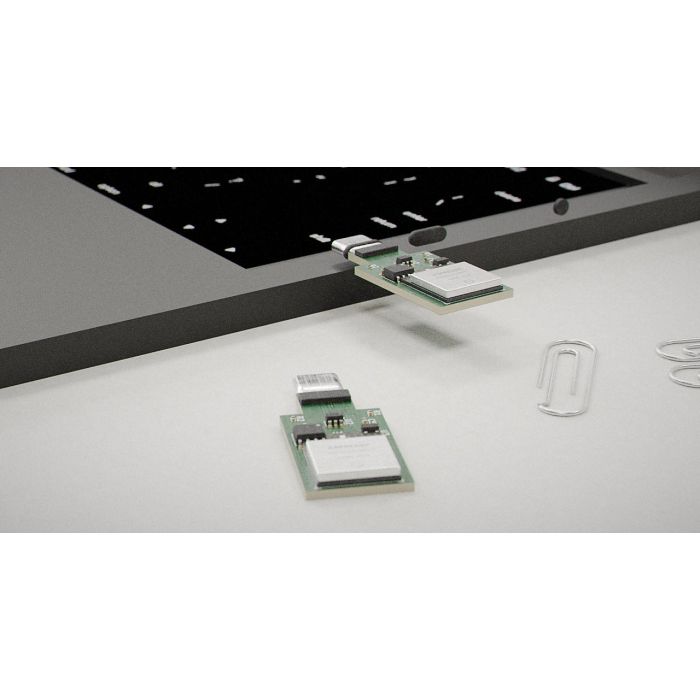
USB Dongle hardware/dongle_usb/dongle_usb.kicad_sch ESP32-S3-MINI-1 (native USB) Plugs into a target PC's USB port, enumerates as a standard USB-HID keyboard+mouse. Driverless. Components: U1 ESP32-S3-MINI-1 ( RF_Module:ESP32-S3-MINI-1 ), U2 USBLC6-2 ESD (SOT-23-6), U3 AP2112K-3.3 LDO (SOT-23-5), U4 24AA02E48 EEPROM (SOIC-8), J1 USB-C receptacle (GCT USB4085), R1/R2 5.1k CC pulldowns (0402), D1 status LED (0603). PCB: 18mm x 45mm, 2-layer FR-4, 1.6mm, 1oz Cu, ENIG finish. 90-ohm USB differential pair routing. Antenna keep-out per ESP32-S3 datasheet. Full layout spec in hardware/dongle_usb/LAYOUT.md. Enclosure: 20x48x7mm snap shell.
Battery USB Dongle hardware/dongle_usb_batt/dongle_usb_batt.kicad_sch ESP32-S3 + LiPo Same USB-HID dongle plus battery subsystem: MCP73831 LiPo charge controller, TPS63020 buck-boost converter, battery connector. Self-powered; works when target USB port is off. Multi-hour operation per charge (design target).
DisplayPort Dongle hardware/dongle_dp/dongle_dp.kicad_sch IT6803 + ESP32-P4 + ESP32-C6 Captures a target PC's DisplayPort output, H.264-encodes via hardware encoder, streams over WiFi 6. Design target: 1080p, 30-80ms glass-to-glass latency. The Fabric runs one DP dongle at full rate at a time; rest at thumbnail.
Battery DisplayPort Dongle hardware/dongle_dp_batt/dongle_dp_batt.kicad_sch IT6803 + ESP32-P4 + ESP32-C6 + LiPo DisplayPort capture dongle with integrated battery subsystem for portable operation.
Wireless Accelerator — Crypto hardware/wireless_accel_crypto/wireless_accel_crypto.kicad_sch
Wireless Accelerator — Storage hardware/wireless_accel_storage/wireless_accel_storage.kicad_sch
USB D+/D- routing 90-ohm differential pair, length-matched, over solid ground plane, no stubs, minimal vias, ESD (U2) in-line
tests/test_uniphi.py 6 tests (3 classes) HubFocusTests: one active target at a time; dispatch only hits active target; capability-filtered routing. LoopbackAdapterTests: write-then-read roundtrip; unsupported action rejection. WifiSocketTests: real TCP WiFi data roundtrip over socket; handshake failure on dead host; CNC gcode streaming with acks (comment stripping verified).
tests/test_fabric.py 5 tests FabricScaleTests (N=8): federates 8 hubs; quiesced grid has no focus; single-focus invariant holds while roaming (2x full ring); input routes only to pointer (disarmed adapter refuses injection); video full only under pointer (moves correctly on pointer change); pointer roam wraps around.
tests/test_pwg.py 5 tests PwgEndToEndTests: three adapters attach with distinct local ports (USB, serial, audio verified by class); USB streams bytes to local presentation (512B); USB write round-trip (ECHO verification); serial responds to *IDN? (cri-one + SIM-DMM in response); audio PCM frame alignment (1600B = 100ms of 16-bit mono at 8kHz, even byte count).
tests/test_gui.py 4 tests GridConsoleTests (offscreen, 8 machines): renders all 8 tiles; pointer is single focus (full_video=1, armed_input=1); click moves pointer and stays single; arrow key roams; typed key routes to pointer.
tests/test_media.py 2 tests MediaPipeTests (offscreen): snapshot is valid image (JPEG SOI or PNG header, >1000 bytes); stream is multipart with frames (boundary marker, JPEG SOI, correct Content-Type).
office.example.json Option A config: two targets (Workshop PC at 192.168.1.21, Conference room PC at 192.168.1.22) with five adapters (CNC mill, bench serial bridge, WS1 power with WoL MAC, conf-room audio, WS2 power with WoL MAC). Port 3737 throughout.
grid_dongles.example.json Option B config: 8 machines (Front desk, Design 1-2, CNC bench, Lab box 1-2, Server A-B) with input (HID) dongles on each and video dongles on the first two. IPs 192.168.1.40-49.
requirements.txt Core runs on stdlib alone. Optional: pyserial ≥3.5 (serial discovery); pycaw ≥20240210 + comtypes ≥1.2 (Windows audio, Windows-only); PySide6-Essentials ≥6.6 (GUI).
Store Deployment and Product Listings
Two product lines are staged for the cri-one.com Magento store, with full deployment automation:
UniPhi Grid Pack SKUs (6 products)
store/deploy_uniphi.py SCP+PHP deploy for 6 UniPhi SKUs: uploads CSV, generates PHP bootstrap for Magento ProductRepository create/update, reindexes, cache-flushes, curl-verifies live URLs. Idempotent. --dry-run / --apply modes.
store/deploy_pwg.py All-in-one PWG deploy: creates 5 products from CSV, updates descriptions + short_descriptions from pwg_descriptions.py, attaches product images, reindexes, verifies.
store/grid_pack_products.DRAFT.csv Magento-importable CSV for 6 UniPhi SKUs.
store/pwg_products.DRAFT.csv Magento-importable CSV for 5 PWG SKUs.
store/push_descriptions.py Pushes long HTML descriptions to existing products.
store/push_product_images.py Uploads product images to Magento.
store/replace_product_images.py Replaces existing product images.
store/make_product_images.py Generates block-diagram product images (one per SKU).
store/make_pwg_images.py Generates PWG product images.
store/pwg_listings.md Human-readable listing preview with pricing and categories.
Patent Application — 20 Claims
The filed non-provisional utility application (U.S. App. 19/717,706) contains 20 claims in three categories:
- System claims (1-8): A system for controlling a plurality of computers comprising retrofit wireless adapters and a control host maintaining single focus with bandwidth-bounding invariant. Covers: atomic focus switching (demote then promote); scale-independent bandwidth; native USB-HID enumeration (driverless); CDC serial interface; three video quality tiers (full/thumb/paused); dual-mode adapters (docked or field); non-volatile identity memory with per-socket addressable multiplexer auto-detection.
- Method claims (9-14): A method of controlling a plurality of computers from a single operator pointer. Covers: focus change sequence (demote video + disarm, then promote video + arm); native USB-HID (no driver); quality tiers; aggregate bandwidth independence; hardware-encoded display capture streaming; auto-detection via identity memory.
- Apparatus claims (15-20): A retrofit wireless adapter comprising: USB connector, microcontroller with native USB device controller enumerating as HID, wireless radio, control logic translating input events to USB-HID reports. Covers: CDC serial interface; CC resistors + ESD protection; rechargeable cell + charge controller + converter (battery mode); non-volatile identity memory; arm/disarm injection responsive to host command.
7 figures described: FIG.1 system block diagram, FIG.2 base controller with adapter sockets, FIG.3 USB retrofit adapter schematic, FIG.4 operator console with stage + thumbnails, FIG.5 adapter-socket interconnect bus, FIG.6 pointer focus-switch flowchart, FIG.7 display-capture adapter.
README.md Main project documentation: architecture, adapters, fabric, GUI, run instructions, protocol spec, tests, roadmap.
PRODUCT_OPTIONS.md Comparison of Option A (Base+Cards) vs Option B (Dongles+Software) with engineering notes.
PERSONAL_WIRELESS_GRID.md PWG technical overview, 2017 deposition tie-in, three launch adapters, protocol, hardware reuse.
patents/FILING_RECEIPT.md USPTO filing record for App. 19/717,706.
patents/Retroactive_Wireless_Adapter_NonProvisional_Utility_Application.md Full patent application text: specification, 20 claims, abstract.
patents/HOW_TO_FILE_NONPROVISIONAL.md Filing guidance for the non-provisional application.
patents/HOW_TO_FILE_TODAY.md Quick-start filing instructions.
patents/_docx_build/build_docx.py Builds the.docx patent application from the Markdown source.
patents/_docx_build/make_figures.py Generates patent figures (FIG.1, FIG.6, etc.).
docs/figures/FIG1_system.png System block diagram (patent FIG.1).
docs/figures/FIG6_method.png Focus-switch flowchart (patent FIG.6).
docs/retroactive_wireless_adapter_art.png Conceptual art for the retroactive wireless adapter.
docs/grid_console.png Screenshot of the GUI grid console.
docs/grid_console_live.png Screenshot with live video feed on stage.
docs/live_frame.jpg Sample live MJPEG frame.
tools/capture_shot.py Renders grid console to PNG (offscreen) for docs. Loads system fonts for readable text on headless platforms.
1 light trigger.txt Master invention list (proprietary IP). Contains the full AutoPhi portfolio context including electromagnetic cooling system patents (1096, 1097, 1098) and LED recycle-powered system patents (3561, 2876, 1026).
Yesterday.txt Portfolio context document covering the AutoPhi technology family.
Contact Information.txt Seller: Christopher G. Brown, Lawrenceville, Georgia.
google_patents_search_list.txt 215 entries for Google Patents search, covering patent applications: 17/687,656; 63/552,008; 29/839,062; 29/892,202; 17/454,808; 17/454,807; 18/650,137; 18/370,908; 18/460,559; 18/219,732; 29/807,411; 29/788,287; 16/948,862; 17/405,832; 19/031,884; 19/177,547; 29/426,139; 29/423,993; 62/393,084; 16/258,495; 16/276,673; 16/240,723; 16/378,597; 62/892,994; 15/825,059; 16/004,322; 62/530,996; 16/794,048; 16/276,664; 16/658,062; 63/086,494; 62/375,115; 62/586,875; 17/448,179.
sb0015a.pdf Supporting patent documentation (PDF).
aia0008.pdf Supporting patent documentation (PDF).
N417-retroactive-wireless-adapter-application.pdf Retroactive Wireless Adapter patent application (PDF).
Retroactive_Wireless_Adapter_NonProvisional_Utility_Application.docx Patent application document (Word format).
__init__.py Core abstractions module init.
adapter.py Adapter base class, AdapterStatus enum (5 states), Capability enum (10 flags), Command dataclass, CommandResult dataclass.
hub.py Target dataclass, ControlHub class (add_target, set_active, attach, attach_kind, adapters_for, connect_target, disconnect_target, dispatch, dispatch_to, snapshot).
transport.py TransportError, Transport base, WifiTransport (TCP, default port 3737, configurable connect_timeout 4.0s), LoopbackTransport (handler-backed, in-process).
registry.py AdapterRegistry class (register decorator, create, kinds, get). Process-wide default registry instance.
discovery.py DiscoveredDevice dataclass, discover_serial (pyserial optional), probe_host (TCP probe, default port 3389), discover_network (explicit host list probing).
events.py EventBus class (on, emit with wildcard support, strict mode). Listener type: Callable[[str, dict], None].
fabric.py Focus dataclass (frozen), Fabric class (add_hub, all_targets, point_at, quiesce, roam/roam_next/roam_prev, send_input, send_video, dispatch, focus_counts, grid_snapshot).
Adapters Package ( uniphi/adapters/ )
__init__.py Imports and registers all 6 built-in adapter kinds.
wifi_data.py WifiDataAdapter class + loopback_controller factory.
cnc_gcode.py CncGcodeAdapter class (gcode/run/jog/home/query actions).
audio.py AudioAdapter class (local pycaw or WiFi modes).
network_target.py NetworkTargetAdapter class + _wake_on_lan helper.
video.py VideoAdapter class (3 quality tiers: full/thumb/paused).
input_hid.py HidInputAdapter class (arm/disarm + key/type/mouse injection).
PWG Package ( uniphi/pwg/ )
__init__.py Exports: PwgHost, AdapterPresentation, PresentationKind, PwgAdapter, AdapterClass.
adapter_base.py AdapterClass enum (USB, SERIAL, AUDIO), AdapterInfo dataclass (hello_frame), PwgAdapter base class (connect, start, stop, read_chunk, on_write, on_control, _loop).
host.py PresentationKind enum, AdapterPresentation dataclass, PwgHost class (start, stop, snapshot, _accept_loop, _handle_adapter with upstream_pump + downstream_acceptor + client_writer, _tear_down). Callbacks: on_attach, on_detach.
__main__.py CLI launcher (--demo with 3 sim adapters, --listen for production).
GUI Package ( uniphi/gui/ ), Media Package ( uniphi/media/ ), Sim Package ( uniphi/sim/ )
gui/__init__.py Exports: GridConsole, launch.
gui/grid_console.py MachineTile (QFrame, 190x130px, clicked signal), GridConsole (QMainWindow: stage, wall, status bar, timer, keyboard capture, MJPEG client, pointer ops, refresh, keyPressEvent), launch.
gui/mjpeg_view.py MjpegClient (QThread, frame signal, SOI/EOI JPEG splitting, repointable URL, 2MB buffer guard).
gui/__main__.py GUI launcher with --grid, --grid-config, --live flags.
media/__init__.py Exports: ScreenSource, MjpegServer.
media/screen_source.py ScreenSource: QScreen desktop capture, JPEG encoding (quality 70), synthetic test-pattern fallback for headless.
media/mjpeg_server.py MjpegServer: threaded HTTP, /stream (multipart/x-mixed-replace), /snapshot (single still).
media/__main__.py Standalone MJPEG server (--host, --port, --width, --fps, --label).
sim/__init__.py Exports: RetrofitControllerSim.
sim/controller.py RetrofitControllerSim (TCP server), _Device (virtual peripheral with buffer, volume, video, HID state).
Top-level Package
uniphi/__init__.py Version 0.1.0. Top-level exports: Adapter, AdapterStatus, Capability, Command, CommandResult, ControlHub, Target, AdapterRegistry, registry.
uniphi/cli.py CLI module (7 functions + main). Full REPL for hub and grid modes.
Video quality tiers Full (focused machine only), Thumbnail (all others), Paused (no frames)
Bandwidth invariant At most 1 full-rate video stream + 1 armed input, grid-wide, regardless of machine count
Python source files 30+ Core (8), Adapters (7), PWG (4), GUI (4), Media (4), Sim (2), CLI (1), Store (7+), Tests (5), Tools (1)
KiCad 10 schematics 19 1 base controller, 4 adapter cards, 4 dongles (USB, battery USB, DP, battery DP), 10 extended boards (server serial, data accel, WiFi/wireless data center, crypto/ML/video/math/storage accelerators, companion IC)
Firmware files 1 ESP32 Arduino/PlatformIO (.ino)
Patent documents 7+ Non-provisional application (MD + 2 DOCX versions), filing receipt, filing guides, DOCX build tools, figures
Configuration examples 2 office.example.json (Option A), grid_dongles.example.json (Option B, 8 machines)
Store CSV/deploy files 10+ 2 Magento CSVs, 2 deploy scripts, description/image push tools, 11 product images
Documentation 6+ README.md, PRODUCT_OPTIONS.md, PERSONAL_WIRELESS_GRID.md, LAYOUT.md, plus figures and screenshots
Test files 5 14+ test cases covering hub, fabric (8-hub), PWG (end-to-end), GUI (offscreen), media pipe
Delivery: Shipped on a Blu-ray disc. All files are encrypted with AES-256. Sent via tracked postal service.
Footnotes
- Product number 8503.
- Family: accelerators adapters.
- Purchase: When you buy, you buy the use of that blueprint only.
-
 ExitPhi Accelerators
Wi-Fi chips designed to replace data-center network cables.
-
 PCIe8 Standard Performance
PCIe 8.0 storage chips sharing work across a data center.
-
 AeroPhi Fractal QBeam
Towers, satellites and chips speaking one network protocol.
-
 PCIe8 Standard
An encrypted, compute-capable SSD for the coming PCIe 8.0.
-
 OTC Vitamins
Nine vitamin formulas for children and adults, labels included.
-
 SellPhi
Your own online store and blog in one install command.
Special Price $19.65 Regular Price $78.59