
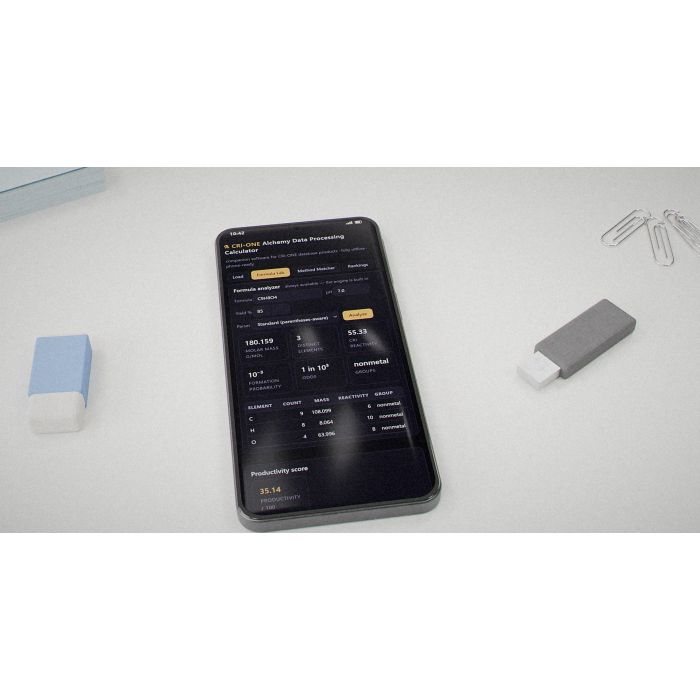
Alchemy Calc
Why you'd want it
One small offline file that turns purchased CRI-ONE datasets into working chemistry and data tools on a phone or PC.
- Who it's for: buyers of CRI-ONE database products who want to explore that data offline on any device.
- The problem it solves: raw CSV and JSON datasets are hard to use without software to search, rank and calculate.
- What you get: one portable HTML calculator file, quick-start guide, demo data and licence notice on Blu-ray. Databases sold separately.
Asset valuation: $1,600,000,000. Two pieces of software live here: Alchemy-Data-Processing-Calculator.html — clean companion software for the CRI-ONE database products, with no data baked in. Buyers of the store packages (HYDROPHI DATABASE, MetalloDrugDB, lite-alchemy JSON) load their purchased file
Imagine a chemist's notebook that fits inside a single web page. Open it on a phone, type a formula - aspirin is already there as the example - and it hands back the molar mass, the elemental makeup, a reactivity reading and a formation probability, computed on the device with nothing sent anywhere. That is the Alchemy Data Processing Calculator: one portable HTML file of about a hundred kilobytes with no data baked in. Nothing to install, no subscription, no internet connection.
It is companion software for the CRI-ONE database products. Three of its nine modules work with no database at all: the Formula Lab, the ten CGB Mathematical Depositions running as live functions, and descriptive statistics over any numeric column. The rest wake up when a buyer loads a licensed CRI-ONE package: the eleven-table HYDROPHI environmental ledger, the MetalloDrugDB of three hundred multi-element pharmaceutical compounds, a method matcher from elements to preparation method and probability, compound rankings you re-weight with sliders, a bill-of-materials calculator that recomputes cost as quantities change, and a data browser that exports any table as CSV. The engine is a JavaScript port of the original Project 63 Python pipeline and reproduces its scoring exactly.
It is for engineering buyers and licensees who hold the CRI-ONE datasets and want one clean tool to work them in a browser. The personal edition with the whole database embedded stays the inventor's own working tool. The buyer walks away with the companion calculator; the underlying IP stays with the inventor.
Valuation
Pre-production blueprint usage right, patent pending, non-exclusive. The analog this product is closest to in the market is computational chemistry + probability datasets — Schrödinger, Materials Studio (BIOVIA), Molecular Operating Environment.
Patent landscape
Database and computational-chemistry IP is patentable in method claims (algorithms + representations). The probability-element-table framework is a novel composition that would file cleanly.
Market opportunity
- Computational chemistry software: $2.5B (2026) → $7B (2032).
- Drug discovery platforms (AI-assisted): $5B+ market.
Comparable transactions
- Schrödinger IPO (2020): $230M raised at $1.8B valuation.
- BIOVIA (Dassault): Materials Studio bundled licenses in $5M–$50M range to pharma/materials buyers.
- Insilico Medicine → funding rounds: $400M+ raised, $1.9B valuation.
Estimated valuation range
Realistic clearing band for a non-exclusive blueprint usage right: $2M (research / single-buyer evaluation) → $20M (strategic non-exclusive with manufacturing / deployment rights).
Listed catalog price: $1,571,820,000 — public anchor for direct enquiry; actual clearing price negotiated inside the range above with the buyer, scope (non-exclusive, territory, field-of-use), and milestone structure.
Description
Copyright © 2010–2026 Christopher Gabriel Brown, CRI-ONE. Patents issued and pending.
The Alchemy Data Processing Calculator is companion software for CRI-ONE database products. It is a single portable HTML file (approximately 100 KB with no data embedded) that runs fully offline in any modern browser on desktop, laptop, tablet, or cell phone. There is nothing to install, no subscription, and no internet connection required. Data loaded into the calculator never leaves the device — it is processed entirely in-browser and remembered in browser storage between sessions.
The calculator recognizes each CRI-ONE dataset automatically on load and unlocks the corresponding processing module. Three modules work with no database at all. The remainder activate when the buyer loads a licensed CRI-ONE database package (HYDROPHI DATABASE, MetalloDrugDB, lite-alchemy engine data, ranking exports, or any bill of materials with quantity and unit-cost columns).
The project also contains AlchemyCalc.html , a personal all-in-one edition (~787 KB) with the entire CRI-ONE database embedded inside it — 4,447+ records across nine tabs, rebuilt from source projects by the build script. This embedded edition is the developer’s personal tool; the store product is the clean companion calculator with no data baked in.
Processing Modules (9 modules)
Module Activation Capabilities
Formula Lab Always on (engine built in) Molar mass (full periodic table, 85 elements), CRI reactivity (21-element table with reactivity values 5–10), elemental composition, formation probability (10 −n for n distinct elements), productivity score. Two parser modes: Standard (parentheses-aware, accumulating) and Legacy (Project 63 parity, overwrite on repeat). Default formula: C 9 H 8 O 4 (aspirin, molar mass = 180.159 g/mol).
CGB Function Library Always on (Project 27) The ten CGB Mathematical Depositions implemented as live, computable functions. Pick a deposition, enter your own parameters, press Compute. Includes the full numerical core: log-gamma (Lanczos g=7 n=9), log-sum-exp, Kahan compensated summation, descriptive statistics (n, min, max, sum, mean, median, standard deviation, quartiles, geometric mean), linear regression (slope, intercept, R²), and formation probability in log form.
Column Statistics Always on (any loaded dataset) Descriptive statistics over every numeric column of any loaded dataset: n, min, max, sum, mean, median, standard deviation, Q1, Q3, geometric mean. Sums use Kahan compensated summation; geometric means compute in log space.
Method Matcher Unlocks with probabilities_lite.json + methods_lite.json Elements → preparation method → probability. Port of the recipe_builder.lookup_methods_for_elements engine. Input a set of element symbols; the matcher finds every probability entry whose element set is a subset or superset of the input, resolves the method name and category, and returns hits sorted by probability descending. “From Formula Lab” button pipes the current formula’s elements directly.
HYDROPHI Ledger Unlocks with HYDROPHI DATABASE CSVs The 11-table environmental database (studies, accruments, elements, reactions, probabilities, cascades, hypotheses, valuations, per_install, planet, vocabulary) with accrument totals calculated live. Table selector, search, sortable columns.
MetalloDrugDB Explorer Unlocks with MetalloDrugDB files Browse all 300 multi-element pharmaceutical compounds. Columns: disease number, disease name, category, primary compound, molecular formula, molecular weight, target concentration, final volume. Click any row to open its formula in the Formula Lab. Stat tiles show dataset summary.
Compound Rankings Unlocks with ranking export CSVs Custom blend re-ranking of compound ranking exports. Five scoring slices (value, clean, nice, novel, safe) across four categories (metals, gases, objects, solvents). Each compound row carries: rank, name, formula, elements, n, value, novelty, probability, hardness (Mohs), cost ($/kg), availability (0–10), recycle net, hazards, uses. The blend mode enables slider-driven re-ranking over any weighted combination of numeric columns with min–max normalization and inverted “afford” criteria.
BOM Calculator Unlocks with any qty + unit-cost table Load any bill of materials; edit quantities and build counts; costs recompute live. Stat tiles show total cost, line items, and per-build cost. Reset button restores original quantities.
Data Browser Any loaded dataset Every loaded dataset displayed in a sortable, searchable table with on-demand actions: “Run engine” (formula → mass, reactivity, probability), “Match methods” (elements → method → probability), and “Export CSV” for any dataset.
The Ten CGB Mathematical Depositions (Function Library)
# Deposition Function / Formula Verification
1 Dimensional Fold V = pi^(n/2) / Gamma(n/2+1) * r^n ; peak at n=5 V(100-sphere) = 2.3682×10 −40 ; V(3)=4π/3; peak at n=5
2 Entropic Bridge S = -k_B * Sum(p * ln(p)) ; tied to Landauer floor 4 uniform outcomes = 2 bits exactly
3 Golden Spiral Convergence F(n+1)/F(n) → phi; r_opt = phi −2 F(41)/F(40) vs phi: error 6.46×10 −13
4 Harmonic Decay Basel sum 1/n² → π²/6; cross-coupled to Laplace decay Partial sum vs pi²/6: 1.6449331 vs 1.6449341
5 Photon Chromosome Encoding Bits per photon from detector specs (wavelength, polarization, intensity) Deposition worked example stated 38.5 raw bits; computed 38.389
6 Quantum Counting Paradox Grover rotation: P = sin^2((2k+1)*theta) N=2 20 : k*=804, P=0.99999976; overshoot to 1608 collapses P to 8.85×10 −11
7 Recursive Growth Bound Master Theorem: T(n) = a*T(n/b) + n c All three cases (leaf-dominated, balanced, root-dominated) correct
8 Thermal Noise Floor Landauer limit: E_bit >= k_B * T * ln(2) ; max FLOPS ceiling At 300 K stated 2.85×10 −21 J; exact value 2.871×10 −21 J
9 Voxel Resonance Psi = Prod[alpha*sin(2*pi*f/N) + beta*e^(-gamma*d^2)] * det(M) Product-of-modes, dead-voxel detection verified
10 Zero-Point Fabrication Casimir pressure: P = -hbar*c*pi^2 / (240*d^4) At d=10 nm: 1.283 atm (deposition worked example corrected from 3 nm to 10 nm)
Chemistry Engine
The calculator engine is a JavaScript port of the original Python pipeline from ALCHEMY_INTEGRATION_FRAMEWORK.py (Project 63). It reproduces the original scoring exactly — the AlchemyCalc embedded edition recomputes every stored Productivity_Score on load and shows a check mark per row when it matches (currently 19/19).
Component Detail
CRI reactivity table 21 elements with reactivity values: H(10), C(6), N(7), O(8), P(6), S(7), Cl(9), K(10), Ca(8), Fe(6), Cu(5), Zn(6), Br(8), Na(10), Mg(8), Al(7), Si(5), Li(10), Rb(10), Cs(10) — classified into nonmetal, halogen, alkali_metal, alkaline_earth, transition, metal, metalloid
Molar mass table 85 elements from H (1.008) through U (238.029) with standard atomic weights
Productivity score formula Score = yield*0.4 + (elements/20)*0.2 + (reactivity/10)*0.2 + (|pH-7|/7)*0.2 , capped at 100
Formation probability 10 −n for n distinct elements; held in exact log form — no underflow at any element count
Formula parsers Standard (parentheses-aware, accumulating: handles Ca(OH)2 correctly) and Legacy (framework parity: overwrite on repeat, bare digits skipped)
SafetyGatekeeper Keyword screening from the Project 63 framework, applied at build time. Blocks 26 substance keywords including controlled substances and precursors.
Display range 10 −308 to 10 308 , readable at both ends (scientific notation below 10 −4 and at/above 10 12 )
Formation probability Exact 10 −n in log form — no underflow at any element count
Factorial-scale work Lanczos log-gamma (g=7, n=9 coefficients); lgamma(5) matches ln(24) to 10 −15
Sub-underflow probability sums Log-sum-exp: sum of two e −800 terms resolves to 10 −347.1 where float64 gives 0
Currency/percent/accounting parsing $45.00, 1,234.5, 12%, (500) parsed to 45, 1234.5, 0.12, −500
Real database file load ~0.1 s per file (studies.csv 96 ms, MetalloDrugDB 90 ms, methods_lite.json 85 ms)
Method matcher parity 221/300 MetalloDrugDB compounds resolve to a method (same as Python pipeline)
07-alchemy-probability-data Compound rankings (value/clean/nice/novel/safe across metals/gases/objects/solvents); blueprint deposition catalog (IDs 96–333, semicolon Magento export) ~280 compound rows; ~1,754 blueprint products
63-prospecting-data Unified alchemy prospects and the scoring engine (ALCHEMY_INTEGRATION_FRAMEWORK.py); the Productivity_Score formula 19 unified prospects
80-global-landscaping Environmental landscaping database: 11 tables (studies, accruments, elements, reactions, probabilities, cascades, hypotheses, valuations, per_install, planet, vocabulary); accrument totals calculator 11 tables / 308 rows
34-environment-restoration Product BOMs (AquaPhi, AtmoPhi, OzonePhi, HomePhi) with rollup; environment product catalog (50 products) 4 product BOMs + rollup; 50 catalog products
16-chemical-cooker Lite-alchemy engine data (24 elements, ~50 methods, probability entries); MetalloDrugDB source (300 disease-to-compound records); cooker hardware BOM; royalty audit log 24 elements, ~50 methods, 300 MetalloDrugDB compounds, cooker BOM lines
27-mathmatical-depositions The 10 CGB Mathematical Depositions (HTML in deposition_files, PDF in deposition_pdfs); indexed by title from HTML tags 10 depositions indexed
Productivity Score min(100, yield*0.4 + (elements/20)*0.2 + (avgReact/10)*0.2 + (|pH-7|/7)*0.2) — identical to ALCHEMY_INTEGRATION_FRAMEWORK.py. Four weighted components: yield (40%), element diversity (20%), average CRI reactivity (20%), pH offset from neutral (20%).
Formation Probability 10 −n for n distinct elements, matching the 07 dataset convention (n=3 → 10 −3 , n=4 → 10 −4 ). Held in exact log form; displayed as “1 in 10 n ”.
Method Matching Port of recipe_builder.lookup_methods_for_elements. For each probability entry, checks if the entry’s element set is a subset or superset of the input set. Matching entries are resolved to method name and category, sorted by probability descending.
Blend Re-Ranking Min–max normalization of each numeric column across the filtered set. “Afford” criteria (cost, hazards) are inverted (1 − normalized). Uniform columns score 0.5 (neutral) rather than 0. Final blend score is the weighted sum of normalized columns per slider weights, re-sorted descending.
Scientific Notation Display Below 10 −4 and at/above 10 12 , values are shown as mantissa×10 exp with Unicode superscript digits. Sub-cent monetary values (
Lanczos Log-Gamma g=7, n=9 Lanczos coefficients. Reflection formula for z
Log-Sum-Exp Adds probabilities far below the 10 −324 underflow floor by shifting all log-values relative to the maximum, summing in linear space via Kahan summation, then shifting back.
Kahan Compensated Summation Maintains a running compensation term so that the small tails of large sums are not lost to floating-point cancellation.
Dataset Auto-Classification The classify() function inspects column names and JSON structure to identify HYDROPHI ledger tables (by matching the 11 table names), MetalloDrugDB (by molecular_formula + disease_name columns or diseases object), lite-alchemy data (methods/entries/elements arrays), compound rankings (formula + value + novelty + probability columns), and BOMs (qty + cost columns).
- MetalloDrugDB (Project 16, patent application 19/630,444) — 300 disease-to-compound records with molecular formulas, molecular weights, target concentrations, and final volumes. The calculator carries the full 300-record compound table and can run the formula engine over all of them in 86 ms. Click any row to analyze its formula in the Formula Lab.
- HYDROPHI DATABASE (Project 80) — 11-table environmental landscaping database with accrument totals. The ledger module renders all tables with live totals.
- AquaPhi / AtmoPhi / OzonePhi / HomePhi (Project 34) — environment restoration product BOMs loaded into the BOM cost lab with editable quantities and live cost totals. The Chemical Cooker hardware BOM (Project 16) is also included as a fifth BOM.
- Compound Rankings (Project 07) — 280 ranked compounds across value/clean/nice/novel/safe slices and metals/gases/objects/solvents categories, with custom blend re-ranking.
- Unified Alchemy Prospects (Project 63) — 19 prospects with live engine-parity verification (19/19 scores match).
Patents and IP Register
The master IP register file ( 1 light trigger.txt , 1,769 lines, 760 KB) contains 1,755 parsed depositions, each with a sequence number, deposition ID, patent number, and title. These are parsed at build time by build_calc.py using a regex pattern matching patent chris(topher)? g(abriel)? brown (\d+) . The IP Register tab in AlchemyCalc displays all depositions in a searchable, sortable table.
The project includes a prior-art scan query list ( google_patents_search_list.txt , 161 lines) organized into seven clusters (A–G) for the WritePhi family, plus reference queries and a priority-date defense anchored at 2017-11-24 (Invent Depositions, ISBN 978-1-979767-89-7).
The license states: “Copyright © 2010–2026 Christopher Gabriel Brown, CRI-ONE. All rights reserved. Patents issued and pending.”
Alchemy-Data-Processing-Calculator.html 1,311 67 KB The store product — clean companion calculator with no data embedded. Single portable file. Contains full HTML/CSS/JS: 96 lines of CSS (dark theme with gold accents, responsive breakpoints at 900px and 640px), 8 tab UI sections (Load, Formula Lab, Method Matcher, Rankings, Ledger, BOM, Function Library, Browser), the complete MATHLIB module (log-gamma, log-sum-exp, Kahan summation, statistics, linear regression, 10 CGB deposition functions), the chemistry engine (CRI reactivity table, molar mass table, two formula parsers, productivity scorer), the method matcher, the dataset auto-classifier, the module store, the generic sortable/filterable table renderer, scientific notation formatter, and all module UI code. Data loading via drag-and-drop, file browse, or URL fetch. Browser storage persistence.
AlchemyCalc.html 972 787 KB Personal all-in-one edition with the entire CRI-ONE database embedded as a JSON payload. 11 tabs: Overview (stat tiles + global search), Formula Lab, Cooker (method matcher + MetalloDrugDB), Compounds, Prospects, Landscaping DB, BOM Lab, Catalogs, IP Register, Depositions, Data In. Built by build_calc.py from template.html .
template.html 972 53 KB Build template for AlchemyCalc.html. Contains __BUILT__ and __DATA__ placeholders replaced at build time. Same UI code as AlchemyCalc.html minus the data payload.
build_calc.py 408 16 KB Build script that reads all six source projects under D:\special\ and regenerates AlchemyCalc.html. Functions: demojibake() (UTF-8/cp1252 repair), coerce() (string-to-number), read_table() (CSV reader with ragged-row handling), is_safe() (SafetyGatekeeper 26-keyword screen), load_compounds() (07: value_*.csv + *_top10.csv across 4 categories and 4 slices), load_blueprint_catalog() (07: 96-333-fixed.csv semicolon Magento export), load_prospects() (63: unified JSON), load_landdb() (80: 11 CSV tables), load_boms() (34: 4 product BOMs + rollup), load_environment_catalog() (34: Magento CSV export), load_cooker() (16: elements, methods, probabilities, MetalloDrugDB, royalties, hardware BOM), load_owner() (81: contact info), load_ip_register() (81: 1,755 depositions parsed from “1 light trigger.txt”), load_depositions() (27: HTML title extraction + PDF cross-reference), main() (assembles payload, injects into template).
make_delivery.py 216 10 KB Builds the buyer-delivery package: AES-256 encrypted, password-protected ZIP archive using pyzipper (WZ_AES, 256-bit). Generates a 24-character password (ambiguous glyphs removed, hyphen-grouped in 6-char blocks). Embeds the archive as a base64 data URI in a self-contained download page. Writes password to DELIVERY_PASSWORD.txt. Contents: the calculator HTML, LICENSE_IP_NOTICE.md, QUICKSTART.txt, demo-data/demo-compounds.csv. SHA-256 verification hash included.
make_product_image.py 141 6 KB Generates store product images using Pillow. Produces a 1200×630 hero image and an 800×800 square catalog thumbnail. Deep blue (#1a5490) headings on gradient background, CRI-ONE alembic mark drawn programmatically, stat tiles (264,410 rows/s, 10 depositions, 10±308 range, 0.56s cold start). House style matches cri-one.com.
test_shipped_product.py 200 9 KB Playwright device tests against the shipped product file opened over file:// in real Chrome. Four test suites: (1) opens from disk, engine works, no console errors; (2) real phone emulation (Pixel 7 + iPhone 13), touch input, no overflow; (3) full archive load of 8 real datasets through the file input, module auto-unlocking, engine over real MetalloDrugDB, column statistics over real data; (4) localStorage persistence across reload, “Clear stored data” wipes everything.
test_store_page_mobile.py 145 7 KB Playwright tests against the live store page (cri-one.com) on three phone profiles (Pixel 7, iPhone 13, iPhone SE). Checks: no page overflow, wide elements are scroll-contained, title + price shown, hero image loads and fits, Add to Cart visible, description content present, stat grid reflows to 1–2 columns, no failed requests. Saves full-page and top screenshots.
1 light trigger.txt 1,769 760 KB Master IP register — 1,755 depositions with sequence numbers, deposition IDs, patent numbers, titles, and image URLs
CONTACT_INFO.txt 16 463 B Owner contact: Christopher Gabriel Brown, address, email, communication policy, eligibility restrictions
google_patents_search_list.txt 161 8 KB WritePhi prior-art scan queries for Google Patents and USPTO, 7 clusters (A–G), priority-date defense
NUMERIC-RANGE.md 127 7 KB Numerical range audit documenting 8 failures found and fixed, the CGB Function Library addition, and the Deposition 10 Casimir pressure correction
PERFORMANCE.md 68 3 KB Performance report: startup times, database load times, engine throughput, stress test results, verification status
README.md 66 3 KB Project overview documenting both apps, the 9-tab AlchemyCalc structure, source projects, rebuild instructions
store-page-description.html 149 10 KB Standalone store page with full description, hero image, stat grid, performance table, module list, price box ($10,000), contact block
product-page.html 242 12 KB Product page variant
download-page.html 66 3 KB Self-contained download page generated by make_delivery.py with base64-embedded encrypted archive, SHA-256 hash, manifest table, getting-started guide
LICENSE_IP_NOTICE.md 53 2 KB License and IP notice: what the buyer receives, what the purchase does NOT grant (no redistribution, no public posting, no IP transfer, no warranty), purchase eligibility
QUICKSTART.txt 33 2 KB Quick-start guide: copy anywhere, double-click, load databases, three always-on modules, browser tab actions
demo-data/demo-compounds.csv — 551 B Fictional demo rows for testing the engine without real data
magento-description.html 169 10 KB Magento product description fragment (no doctype/html/body — injected into theme). All CSS scoped under .crione-pd . Includes hero image via Magento media directive, stat grid, performance table, module list, works-with section, contact block
mobile-check/*.png (6 files) 2.6–4.5 MB each Mobile test screenshots: Pixel 7, iPhone 13, iPhone SE (full-page and top)
root-check/*.png (2 files) 0.8–1.8 MB Root check screenshots: alchemy-data-after, duplicate-label
text-render/*.png (6 files) 5–993 KB Text rendering checks at 1x and 3x: heading, body copy, tag cloud (before and after)
- demojibake(s) — Repairs UTF-8 text decoded as cp1252
- coerce(v) — Converts numeric-looking strings to int/float for compact JSON payload
- read_table(path, delimiter) — CSV reader returning {columns, rows} with blank-line skipping and ragged-row padding
- is_safe(text) — SafetyGatekeeper keyword screen (26 blocked terms)
- load_compounds() — Reads value_*.csv and *_top10.csv across 4 categories × 4 slices from Project 07
- load_blueprint_catalog() — Parses 96-333-fixed.csv (semicolon Magento export) for blueprint depositions
- load_prospects() — Reads unified_alchemy_prospecting_data.json from Project 63
- load_landdb() — Reads 11 CSV tables from Project 80 database directory
- load_boms() — Reads 4 product BOMs + rollup from Project 34
- load_environment_catalog() — Reads Magento catalog export from Project 34
- load_cooker() — Reads elements, methods, probabilities, MetalloDrugDB, royalties, and hardware BOM from Project 16
- load_owner() — Parses CONTACT_INFO.txt
- load_ip_register() — Parses 1,755 depositions from “1 light trigger.txt” with regex for patent numbers
- load_depositions() — Indexes HTML deposition files from Project 27, cross-references PDFs
- main() — Assembles all payloads, injects JSON into template.html, writes AlchemyCalc.html
Alchemy-Data-Processing-Calculator.html (1,311 lines) — JavaScript modules
- $(id) , esc(s) — DOM helper, HTML escaping
- sci(v, sig) , supNum(n) , fmt(v) , money(v) — Scientific notation display with Unicode superscripts
- MATHLIB (IIFE module) — Physical constants (K_B, HBAR, C_L, PHI), lgamma(z) , gamma(z) , extent(v) , ksum(v) , logSumExp(logs) , mean(v) , variance(v) , stddev(v) , quantile(v,q) , median(v) , geomean(v) , linreg(xs,ys) , describe(v) , formationProb(n) , deposition functions D.dimensionalFold , D.entropicBridge , D.goldenSpiral , D.harmonicDecay , D.photonBits , D.grover , D.masterTheorem , D.landauer , D.voxelResonance , D.casimir
- tableView(tableEl, footEl, opts) — Generic sortable/filterable table renderer with numeric column detection, sort indicators, row-click handlers, pagination
- CRI — 21-element reactivity constant object (mass, reactivity, group)
- MASS — 85-element molar mass constant object
- parseLegacy(f) — Legacy formula parser (Project 63 parity)
- parseStd(f) — Standard parentheses-aware formula parser
- analyze(formula, mode) — Full formula analysis returning elements, rows, count, avgReact, fullMass, groups
- productivity(yieldPct, pH, count, avgReact) — CRI-ONE unified prospecting score
- classify(name, t, rawJson) — Dataset auto-classifier for HYDROPHI ledger, MetalloDrugDB, lite-alchemy, rankings, BOMs
- activate(id) — Tab switcher
- SETS , MOD — Module store and module state objects
- matchMethods(list) — Method matcher (port of recipe_builder)
make_delivery.py (216 lines)
- make_password(n=24) — Cryptographic password generation with ambiguous-glyph removal
- build_archive(password) — AES-256 encrypted ZIP creation with pyzipper
- human(n) — Human-readable file size formatter
- PAGE_TMPL — Download page HTML template with dark/light theme support
- main() — Orchestrates archive build, base64 embedding, page generation, password file
make_product_image.py (141 lines)
- font(name, size) — Font loader with fallback to default
- alembic(d, cx, cy, s, fill) — Draws the CRI-ONE alembic mark programmatically (flask body, neck, lip, contents)
- vgrad(size, top, bottom) — Vertical gradient background generator
- center(d, box, text, fnt, fill) — Centered text renderer
- tiles(d, items, x, y, tw, th, gap, kf, vf) — Stat tile row renderer
- hero() — 1200×630 hero image generator
- square() — 800×800 square image generator
test_shipped_product.py (200 lines)
- check(name, ok, detail) — Test result recorder
- main() — Playwright test runner: 4 test suites covering file:// open, phone emulation (Pixel 7 + iPhone 13), dataset loading (8 files), localStorage persistence
test_store_page_mobile.py (145 lines)
- check(name, ok, detail) — Test result recorder
- main() — Playwright live-site tester: 3 phone profiles (Pixel 7, iPhone 13, iPhone SE), overflow detection, scroll containment, content visibility, stat grid reflow, screenshot capture
Delivery
Shipped on a single Blu-ray disc , AES-256 encrypted, via tracked postal delivery. The buyer-delivery archive (CRIONE-ALCHEMY-CALC-01-delivery.zip) is password-protected; the password is issued to the buyer with the purchase receipt by email. The archive contains: Alchemy-Data-Processing-Calculator.html, LICENSE_IP_NOTICE.md, QUICKSTART.txt, and demo-data/demo-compounds.csv. SHA-256 verification hash provided. Database packages are licensed and delivered separately.
Footnotes
- Product number 8531.
- Family: alchemy data.
- Purchase: When you buy, you buy the use of that blueprint only.
-
 Alchemy Calc Two
The second-generation offline calculator, with 50 live functions.
-
 Prospecting Data
Three chemistry research projects in one ranked, searchable set.
-
 Alchemy Calculator
Acquire the whole Alchemy Calc software line and brand.
-
 Dimensional Compound Discovery
41 compounds mapped across pH, alkalinity and oxidation.
-
 QBattery Calculator
Acquire the Q-Battery calculator that also writes circuit code.
-
 ICWritePhi Study — Kits Blueprint
The material recipes for each printed chip layer.
Special Price $156.25 Regular Price $625.00