
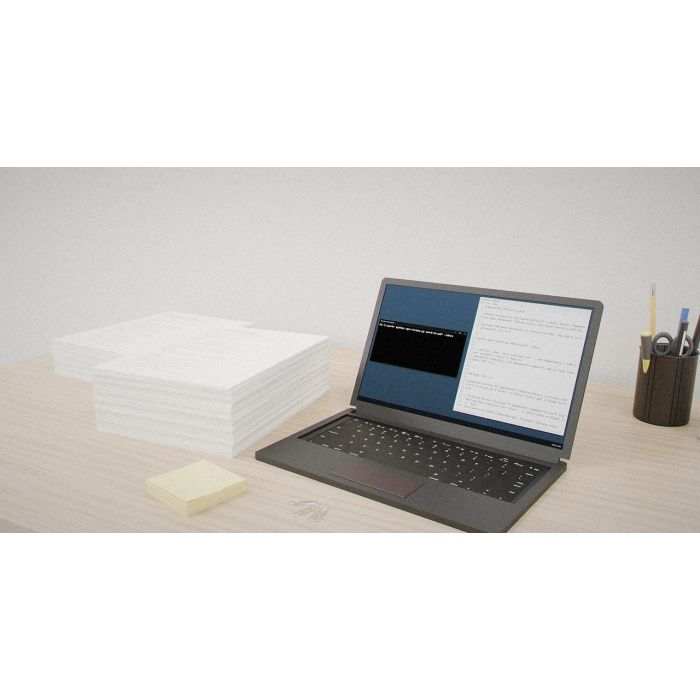
WonderPhi Office
Why you'd want it
Batch-process folders of Word, Excel and PowerPoint files in parallel without writing automation scripts.
- Who it's for: Windows offices and admins handling hundreds of Office documents at once.
- The problem it solves: repetitive conversions like Word to PDF, done in parallel from one command.
- What you get: a Python script with 10 Office recipes and documentation. Needs Microsoft Office and WonderPhi Compute.
Asset valuation: $1,200,000,000. Batch recipes for Microsoft Office — Word, Excel, PowerPoint — that emit WonderPhi Compute plans. You never write a plan by hand. You have 500 Word documents to convert to PDF. You don't script Word automation. You run:
Imagine a shared drive holding five hundred Word documents that all need to be PDFs by Monday. You could open them one at a time, or script Word automation yourself. WonderPhi Office does neither. It is a companion library to WonderPhi Compute: point one of its ten recipes at a folder and it writes a plain-text plan, one line per document, each line a self-contained PowerShell call into Word, Excel or PowerPoint. You never write a plan by hand. WonderPhi Compute then runs the plan across every CPU core in parallel.
The ten recipes are the everyday chores of an office fleet: Word to PDF, legacy .doc to modern .docx, authorship and comments stripped from a shared folder, workbooks to CSV or PDF, decks to PDF or one PNG per slide, and two audit recipes that write a JSON inventory line and a SHA-256 checksum per file for tamper-evident archives. The whole library is one Python file, 245 lines, standard library only - no pip install, no network, no telemetry. It never touches wpc.exe, and every command it emits is printed verbatim in the plan, so you can read what will run before it runs. Windows only, with Microsoft Office on the machine that runs the plan.
This is for the IT team, the records office and the compliance desk keeping a Windows estate in order. The buyer walks away with the script, the ten recipes and a plan format WonderPhi Compute already reads; the copyright, the WonderPhi name and the patent-pending claims stay with the inventor.
Valuation
Pre-production blueprint usage right, patent pending, non-exclusive. The analog this product is closest to in the market is integrated software stacks for consumer and enterprise compute — Microsoft Windows + Office, Apple ecosystem, Google Workspace.
Patent landscape
Software-stack IP is primarily held via copyright and trade secret; patents cluster around specific algorithmic innovations and system integrations. The WonderPhi stack's hardware co-design is a novel patentable angle.
Market opportunity
- Enterprise productivity suites: $55B (2026) → $90B (2032).
- Smartphone platform IP (per device): $2–$15 royalty streams × billions of units.
Comparable transactions
- Microsoft → GitHub (2018): $7.5B.
- Oracle → Sun (2010): $7.4B (full-stack).
- Qualcomm per-handset licensing: $10–$25 per device, billions annual.
Estimated valuation range
Realistic clearing band for a non-exclusive blueprint usage right: $1.5M (research / single-buyer evaluation) → $15M (strategic non-exclusive with manufacturing / deployment rights).
Listed catalog price: $49 — public anchor for direct enquiry; actual clearing price negotiated inside the range above with the buyer, scope (non-exclusive, territory, field-of-use), and milestone structure.
Description
Copyright: © 2026 Christopher Gabriel Brown. All rights reserved.
IP protection: Copyright registered under 17 U.S.C. § 102(a)(1) as a literary work. The WonderPhi name, the constitutional commandments text, the plan.wpc.txt format, and the recipe library structure are the author’s intellectual property. Patent pending — all rights to seek additional patent protection are expressly reserved by the inventor. See the parent product WonderPhi Compute (USPTO App. No. 19/717,706) for the portfolio context.
WonderPhi Office is a companion library to WonderPhi Compute . It ships 10 batch-processing recipes for Microsoft Word, Excel, and PowerPoint. Point a recipe at a folder of Office files and it emits a ready-to-run .plan.wpc.txt plan — one PowerShell + COM invocation per document — that WonderPhi Compute then executes across every CPU core in parallel.
…and out comes docs.plan.wpc.txt , ready to feed to wpc.exe .
Separation of concerns The library writes the plan. WonderPhi Compute runs the plan. Nothing in WonderPhi Office executes your files — it only reads a folder and writes a .txt .
Zero external dependencies Pure Python, standard library only. No pip install . No network. No telemetry.
Constitutional integrity Never modifies wpc.exe . The 10 Commandments stay intact. The constitutional checksum is never touched.
Transparency Every emitted command is shown verbatim in the plan file. Nothing is hidden or obfuscated.
Windows native Recipes drive Word, Excel, and PowerPoint via COM automation ( Word.Application , Excel.Application , PowerPoint.Application ). Requires Microsoft Office installed on the machine that runs the plan.
Three-Step Workflow
- python wpo-recipe.py --list — see every recipe
- python wpo-recipe.py — generate the plan
- wpc.exe .plan.wpc.txt — WonderPhi Compute runs it in parallel
The 10 Recipes
Every recipe uses the files input model — scan a folder for matching extensions, emit one plan task per matched file.
# Recipe Name Category What It Does Requires
1 word-to-pdf Word Convert each Word document to PDF via Word COM (SaveAs format 17) Microsoft Word
2 word-to-docx Word Normalize legacy .doc , .rtf , .odt files to modern .docx (SaveAs format 16) Microsoft Word
3 word-strip-metadata Word Strip authorship, comments, and revisions from each Word document (RemoveDocumentInformation code 99, then SaveAs format 16) Microsoft Word
4 excel-to-csv Excel Export each workbook’s active sheet to CSV (SaveAs format 6) Microsoft Excel
5 excel-to-pdf Excel Export each Excel workbook to PDF (ExportAsFixedFormat type 0) Microsoft Excel
6 excel-to-xlsx Excel Normalize legacy .xls , .xlsm , .csv , .ods files to modern .xlsx (SaveAs format 51) Microsoft Excel
7 ppt-to-pdf PowerPoint Convert each PowerPoint deck to PDF (SaveAs format 32) Microsoft PowerPoint
8 ppt-to-images PowerPoint Export every slide of each deck to a PNG in its own subfolder (SaveAs format 18) Microsoft PowerPoint
9 office-inventory Audit Emit a JSON inventory line per Office file — full path, size in bytes, last-modified timestamp (via Get-ItemProperty + ConvertTo-Json ) PowerShell (built-in)
10 office-sha256 Audit SHA-256 checksum each Office file for tamper-evident archives (via certutil -hashfile ) certutil (built-in)
Each recipe embeds a self-contained PowerShell one-liner into the plan. The one-liner is designed to be run by cmd.exe dispatch via powershell -NoProfile -Command "..." . Every invocation follows the same pattern:
- Create a COM object ( New-Object -ComObject Word.Application , Excel.Application , or PowerPoint.Application )
- Set Visible=$false (and DisplayAlerts=$false for Excel)
- Open the source file
- Save/export to the target format
- Close the document and quit the application in a try/finally block
COM Object Recipes Using It Format Codes Used
Word.Application word-to-pdf , word-to-docx , word-strip-metadata 17 (wdFormatPDF), 16 (wdFormatDocumentDefault / .docx)
Excel.Application excel-to-csv , excel-to-pdf , excel-to-xlsx 6 (xlCSV), 0 (xlTypePDF via ExportAsFixedFormat), 51 (xlOpenXMLWorkbook / .xlsx)
PowerPoint.Application ppt-to-pdf , ppt-to-images 32 (ppSaveAsPDF), 18 (ppSaveAsPNG)
Convert every Word document in a folder to PDF python wpo-recipe.py word-to-pdf .\docs --outdir .\pdfs
Normalize legacy .doc/.rtf into modern .docx python wpo-recipe.py word-to-docx .\legacy --outdir .\modern
Strip metadata from a shared folder python wpo-recipe.py word-strip-metadata .\shared --outdir .\clean
Export every Excel workbook’s active sheet to CSV python wpo-recipe.py excel-to-csv .\workbooks --outdir .\csv
Export every PowerPoint deck to PDF python wpo-recipe.py ppt-to-pdf .\decks --outdir .\pdfs
Export every slide of every deck as PNG python wpo-recipe.py ppt-to-images .\decks --outdir .\slides
Build a JSON inventory of every Office file in a tree python wpo-recipe.py office-inventory .\shared --outdir .\audit
SHA-256 checksum every Office file python wpo-recipe.py office-sha256 .\evidence --outdir .\hashes
Plan File Format
Every generated plan begins with the # WPC v1 header line, followed by metadata comments identifying the recipe name, description, output directory, and task count. Each subsequent line is a single executable command — one task per line, one file per task. The plan is a plain-text .plan.wpc.txt file, fully compatible with WonderPhi Compute’s parallel runner.
The entire library is a single Python file: wpo-recipe.py (245 lines, 10,020 bytes). Key internal components:
Component Description
RECIPES list Registry of all 10 recipe dictionaries, each containing: name , cat (category), needs (prerequisite), model (always "files" ), inputs (glob patterns), out_ext (output extension), desc (description), tmpl (PowerShell command template)
scan_files() Recursive file scanner using Path.rglob("*") with fnmatch pattern matching against the recipe’s input glob set
emit_plan() Plan generator that formats each template with src , stem , name , out , and outdir placeholders, doubling backslashes for Windows path safety
list_recipes() Pretty-printer that groups recipes by category and displays name, description, and prerequisites
main() Argument parser using argparse with recipe lookup, input validation, and plan output routing
Python imports (all standard library): argparse , fnmatch , os , sys , pathlib.Path .
Retail Single-User LICENSE — WonderPhi Software License v1.0.0 Perpetual, non-exclusive, non-transferable license tied to the buyer. No expiration, no renewal, no seat count, no activation, no telemetry. Install on any machines you personally own. Read, study, and modify the source for personal use. Use for any lawful workload, personal or commercial, that produces output for yourself or your employer.
Industrial (Commercial) LICENSE-INDUSTRIAL.txt — WonderPhi Software License v1.0.0 Industrial Perpetual, non-exclusive, non-transferable organizational license. No seat count, no machine limit, no renewal, no activation, no telemetry. Covers all machines, VMs, containers, and cloud instances operated by the licensed organization. Employees, contractors, and consultants may operate under the organization’s direction. Cannot repackage, rebrand, or embed in a product sold to third parties (OEM license available separately).
Both licenses are governed by the laws of the State of Georgia, USA, with exclusive jurisdiction in Gwinnett County, Georgia.
wpo-recipe.py 10,020 bytes 245 The recipe generator — pure Python, standard library only. Contains all 10 recipes, the PowerShell command templates, the file scanner, and the plan emitter.
README.md 4,248 bytes 127 Full documentation — what-this-is, three-step workflow, all 8 usage examples, recipe table, options table, and package inventory.
INDEX.md 1,401 bytes 24 Recipe index table — generated from the registry in wpo-recipe.py . Lists all 10 recipes with category, model, prerequisites, and description.
LICENSE 4,919 bytes 126 WonderPhi Software License v1.0.0 — Retail Single-User. 9 sections covering grant, restrictions, IP, warranty, liability, termination, and governing law.
LICENSE-INDUSTRIAL.txt 6,163 bytes 146 WonderPhi Software License v1.0.0 — Industrial (Commercial License). Organizational-scope variant with OEM and change-of-control provisions.
LICENSE.bak-20260723 1,913 bytes 56 Pre-release proprietary license backup. Contains patent notice, purchase terms, and constitutional warranty reference.
release/wonderphi-office-v1.0.0.zip 6,908 bytes — Distribution archive — the shipping zip for the product.
Total source size: 28,664 bytes across 6 text files (724 lines) plus the 6,908-byte release zip.
WonderPhi Compute (SKU: WONDERPHI-COMPUTE-100) The parallel runtime Required — wpc.exe runs the plans that WonderPhi Office generates
WonderPhi Library (SKU: WONDERPHI-LIBRARY-100) 25-recipe general-purpose library Sibling — broader recipe set covering encoding, hashing, image conversion, and more
WonderPhi Autonomous Compute (SKU: WONDERPHI-AUTONOMOUS-100) Observer that auto-runs detected patterns Add-on — autonomous execution layer with 7-layer safety envelope
How this is delivered
This package ships on a single Blu-ray disc, posted to the delivery address on your order. The archive on the disc is AES-256 encrypted; the passphrase is sent separately, by email, once the disc is despatched — so the disc alone is of no use to anyone who intercepts it.
Discs are despatched by tracked, signed-for post. Allow 5 business days for mastering and verification before despatch.
© 2026 Christopher Gabriel Brown. All rights reserved.
Footnotes
- Product number 8518.
- Family: wonderphi.
- Purchase: When you buy, you buy the use of that blueprint only.
-
 WonderPhi Server
Run one admin task across many servers at once.
-
 WonderPhi Compute
Run a command list across every processor core at once.
-
 WonderPhi Host
Back up and maintain many websites from one list.
-
 WonderPhi Library
Ready-made WonderPhi Compute plans for common tools.
-
-
 BGA Library Validate
Mid-size AutoPhi chip packages plus a tool to validate them.