
OFFICE-RAG — Fundamentals for Working With AI
Monday morning
You hired an AI. Or soon an SI. Monday goes the same. You open a session and it knows nothing. Not your name, not what you call the thing on the second shelf, not which folder is live and which is the copy. Not the one drawer it must never open. So you explain. Tuesday, you explain again. You are the only memory in the room.
What it is
OFFICE-RAG is a kit for one person who works beside an AI. At the center is a kernel: a folder of plain-text files the AI reads on turn one, so it knows who you are, what you call things, who you work with, what has been decided, and what it must never touch. Around the kernel sit double-click Windows .bat wizards, matching AI prompts, and fast-read formats for the machine. Chris's own filled-in kernel is the worked example; a blank template kernel and an onboarding wizard build yours in about a week. One zip, 155 KB, SHA-256 published.
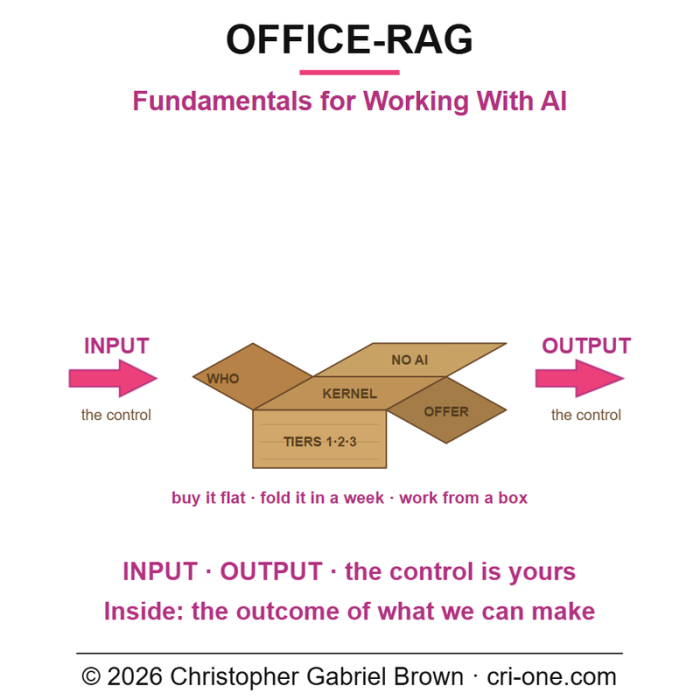
Built for AI as it is today, the same shape holds for SI (Super Intelligence) tomorrow, or any new mechanic you have not learned yet. The hero image is the idea in one picture: a flat cardboard sheet folds into a box. Input in on the left, output out on the right. The control is yours.
What it is not
It is not software you install and it is not a model. It is not a subscription, an account, or a prompt pack. The kit itself contacts nothing. It does not make the AI smarter. It makes the AI informed about you, and it draws the line the AI may not cross. It promises no outcome. It is text you can open in Notepad and change, a few scripts, and a way of working.
Ten minutes in
You double-click the first wizard. The AI asks a short round of questions, you answer in your own words, and it writes the answers into the kernel. The AI now knows your name for your work, your mission in one line, the people around you by role, and the first entries on its own forbidden list. The pair is in place: WHO_IS_YOU.md, who you are, and NO_AI_ACCESS.md, what it must never read or touch. Two halves of one thing. Telling an AI who you are without telling it where it may not go is half a job. What it still cannot touch: keys, passwords, banking, government IDs, health. What you stopped repeating: your introduction.
That afternoon
You double-click the second wizard and go back to work. The AI watches. No quizzing. It notices desktop icons, folders, the taskbar, the tools on the bench, open notes, running services, and writes down what it saw. Watching is not reading: the forbidden list did not move. What you stopped repeating: "it is in the folder on the second drive."
End of week one
The third wizard asks for deeper sources one at a time; each gets its own yes or no. Every yes is paid back as a working .bat on your desktop. Every permission is written down as a standing agreement with a revisit date. It still cannot touch anything you said no to, and the five classes above have not loosened by one line. What you stopped repeating: the permission conversation.
End of month one
No wizard. The kernel keeps itself: every session appends an audit line, and every decision and correction lands in the right file. Every exchange now carries two numbers, HOW MUCH and HOW LONG, stated before the question starts and reconciled after. The axiom under it is Chris's: nothing is free in this world. Both sides pay, both sides get. The same Offer runs at session, project, vendor and buyer level. NEGOTIATIONS.md shows one inventor's standing agreements as the worked example. The AI now knows what you have confirmed and what you have pushed back on. What you stopped repeating: nearly everything from that first Monday.
Underneath it all sit two tools with equal weight, the voice (AI or SI) and the battery (compute, substrate, hardware). Neither is secondary. The mission on top is yours.
Who it is for
A person running an extraordinary ambition solo, working beside an AI they have not trained yet. Anyone who does not yet know how to train a human to work with things they have never heard of. Built for one operator, not a department.
What ships
The manifest counts 24 files: fifteen plain-text kernel files, four double-click .bat wizards, four matching AI prompts, and the hero image. Twelve of the fifteen are the kernel proper, the ones every session reads. The other three are the brief, the blank templates, and the onboarding wizard. The kernel also comes in fast-read form: a JSONL stream, JSON, and a manifest with a SHA-256 per file. WHO_IS_CHRIS.md is the filled-in exemplar; yours becomes WHO_IS_YOU. You can read all of it before you let an AI near it.
Honest status
Built in CRI-ONE's own office in October 2026 and used in practice there. Not externally reviewed. Not security-audited. The test is one question: can a new AI session read the kernel and be useful on turn one. Sold by Christopher Gabriel Brown, a sole proprietor doing business as CRI-ONE. The contract names him personally. At USD 24.99 it is priced to be tried.
License
Use of this blueprint only · No IP sold · Not sublicensable
You may install it, run it, modify it, and fold it into your own tooling over your own files. You may not sublicense, resell, assign or transfer it, except as part of a bona fide sale of your business as a whole.