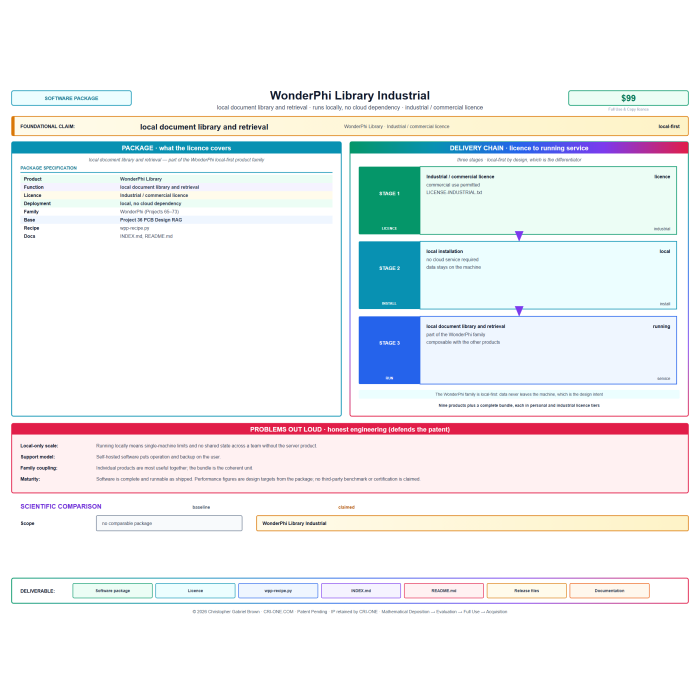
WonderPhi Library Industrial -- Commercial License
Commercial-license edition of the 25-recipe Library. Fleet deployment across ffmpeg / ImageMagick / PDF / hashing / GPU workflows.
© CRI-ONE. All rights reserved. Patents issued and pending. Unauthorized reproduction of the underlying designs is prohibited.
Extended catalog & full narrative — WonderPhi Library Industrial -- Commercial License
The extended dossier appended from the 2026-08-05 catalog snapshot. Prices in the body copy have been stripped; the live-store price on this page is the authoritative figure. Images have been omitted.
WonderPhi Library for organizations — perpetual single-organization commercial license
Everything below is identical to the retail product. What's different: your license covers the entire buying organization (unlimited machines, VMs, containers, cloud instances) with no seat count, no annual renewal, no telemetry, no activation. Redistribution / SaaS / hosted-service exposure require a separate OEM arrangement.
Easy Setup — No Package Manager, No Account, No Cloud
Single Python file. Python 3.8+ standard library only — nothing to pip install. Run with:
python wpc-recipe.py
Sample plan files ship with the download and run out of the box. Pair with WonderPhi Compute to execute the generated plans in parallel.
WonderPhi Library — 25 ready-made batch recipes for the tools you already use
Twenty-five hand-written recipes that turn everyday command-line tools (ffmpeg, ImageMagick, 7-Zip, curl, git, PDF tools, GPU utilities) into parallel batch jobs. Point at a folder, get a plan file, hand it to WonderPhi Compute, watch every core work at once.
Why this exists
The tools we love — ffmpeg, ImageMagick, curl, PDF utilities — are wonderful for one file at a time. But when you have two hundred files, the manual copy-paste ceremony is soul-crushing: type the command, wait, type the next, wait.
Recipes are the shortcut. Each one knows how to fan out a common tool across many inputs. You spend five seconds telling it what folder to look at, and it spits out a plan file that WonderPhi Compute runs across every CPU core simultaneously.
What it is, in plain English
A "recipe" is a small, opinionated Python function that takes a folder of inputs and writes a plain-text plan file. That plan says "run this exact command on this exact file", one line per input file. WonderPhi Compute reads the plan and runs every line in parallel. You end up doing an afternoon's manual work in the time it takes to make coffee.
How you use it — three steps
- Run the recipe file.
python wpc-recipe.pyin the folder that contains your input files, or wherever you want the plan written. - Point at the target. The recipe asks (or reads from a text file) what the input is — a folder, a list of hostnames, a CSV, whatever the recipe expects. It writes a plan file: one shell command per line.
- Hand the plan to Compute. Drop the generated
plan.wpc.txtinto the WonderPhi Compute inbox, and every command runs in parallel across your cores. Read the honest log when it's done.
Worked examples — three of the 25 recipes in this library
ffmpeg-transcode-batch — encode 200 videos to h264/mp4
Point at a folder of .mov/.avi/.mkv sources. Recipe emits a plan-line per file. Compute runs them across every core.
python wpc-recipe.py ffmpeg-transcode-batch --input ./raw --output ./mp4 --codec h264 --crf 22

# generates: plan-ffmpeg-2026-07-23.wpc.txt
# ffmpeg -i ./raw/clip01.mov -c:v libx264 -crf 22 ./mp4/clip01.mp4
# ffmpeg -i ./raw/clip02.mov -c:v libx264 -crf 22 ./mp4/clip02.mp4
# ... (one line per source file)
imagemagick-thumb-grid — make thumbnails of every image in a folder
One line per image. Runs concurrently. Comes back with 4,000 thumbnails in under a minute on a 40-core box.
python wpc-recipe.py imagemagick-thumb --input ./photos --output ./thumbs --size 320x320

# generates: plan-imagemagick-2026-07-23.wpc.txt
# magick photos/IMG_0001.jpg -resize 320x320 thumbs/IMG_0001.jpg
# magick photos/IMG_0002.jpg -resize 320x320 thumbs/IMG_0002.jpg
# ...
sha256-tree — verify integrity of a big backup
Emits a plan that hashes every file. WonderPhi Compute achieves ~14× speedup vs a serial script on typical mixed-file directories.
python wpc-recipe.py sha256-tree --input D:\backup-2026 --output backup-hashes.txt

# generates: plan-sha256-2026-07-23.wpc.txt
# certutil -hashfile "D:\backup-2026\file001.dat" SHA256 >> backup-hashes.txt
# certutil -hashfile "D:\backup-2026\file002.dat" SHA256 >> backup-hashes.txt
# ...
Verified capabilities
Recipes work on any Windows or Linux machine with the underlying tool installed. The plan-file scaling is measured against WonderPhi Compute on a dual Xeon Gold 6138T (40/80 cores):
- 25 different tools automated — ffmpeg, ImageMagick, PDF tools, 7-Zip, curl, git, GPU utilities, hashing, thumbnailing, mp4-remux, and more.
- Every recipe is one function — you can read every line of code. No opaque frameworks, no hidden state.
- Plan files are portable. A plan generated on Windows can be run on Linux, and vice-versa, as long as the target tool exists on both.
Every claim is testable on your own machine using the sample plans in the download.
Under the hood — the honest technical picture
The recipe file is one .py file, ~400 lines. Each recipe is a small function that takes a target folder plus a few flags and emits a plan file to stdout or to disk. No hidden state, no plugin system, no config file — if a recipe misbehaves, you can literally read the 15 lines that produced the output.
- Standard library only. No dependencies, no
pip install, no supply-chain risk. - Plans are plain text. Every emitted plan is human-readable. You can edit one by hand before running it if you want to tweak.
- Recipes are opinionated but small. Each does one job well. If a recipe doesn't fit your exact case, copy it and modify — every recipe is under 30 lines of code.
- No mutation of your inputs. Recipes only read the input folder. Every line in the emitted plan writes to a separate output folder that you specify.
- Deterministic output. Same inputs plus same flags = same plan file. Diff-friendly for source-control workflows.
How it compares to the manual way
| Aspect | The typical alternative | This product |
|---|---|---|
| Setup cost per new batch job | Write a shell loop, debug quoting, hope it works | Run one recipe with 2 flags. Get a working plan file. |
| Portability across machines | Shell loops are shell-specific (bash vs zsh vs PowerShell) | Plans are plain text — run anywhere Compute runs |
| Auditability | Shell history, if you remember to save it | Every generated plan is a file. Timestamped. Kept forever. |
| Failure isolation | One typo = whole loop dies | One typo = one plan-line fails. The other 199 finish. |
| Reuse across projects | Copy-paste the loop, hope you got it right | Same recipe, different --input flag |
What you need
- Python 3.8+ to run the recipe file. That's it — standard library only.
- The underlying tool the recipe wraps (
ffmpeg, ImageMagick, etc.) — recipes call them, they don't ship them. - WonderPhi Compute to run the generated plan in parallel. (Sold separately, or bundle everything with the Complete Bundle.)
- Windows, macOS, or Linux. Individual recipes may need a specific OS — e.g. an ImageMagick recipe needs
magickin your PATH.
What's in the download
wpc-recipe.py— the recipe generator (Python 3.8+, standard library only)README.md— per-recipe reference for humansINDEX.md— alphabetical list of every recipe with a one-line descriptionsamples/— ready-to-run demo input files for every recipeLICENSE.txt— perpetual single-user license, personalized with your name and order number at delivery
Common questions
Q. Do I need WonderPhi Compute to use these recipes?
The recipe files themselves generate plan files — you can read those plans and run them by hand serially if you want. To get the parallel speedup, yes, you want Compute. Bundle deal is here.
Q. Can I add my own recipes?
Yes. The recipe file is under 400 lines — each recipe is a small function. Copy an existing one and modify. Your license allows personal-use modifications; you just can't redistribute the modified recipe file.
Q. What tools does it cover?
The 25 include ffmpeg (video encode/remux), ImageMagick (resize/format/thumbnail), 7-Zip (compress/extract), curl (parallel HTTP), git (bulk operations), PDF tools (extract text, split, merge), hashing (SHA-256/MD5), GPU utilities, and more. See INDEX.md inside the download for the full list.
Q. Does it phone home?
No. Zero network access. The recipe file uses only Python's standard library and writes only where you told it to write.
Glossary — every term used above, in plain English
- Recipe
- One of the ready-made plan-file templates in this library. Each recipe knows how to do one job across many inputs.
- Plan file (
*.wpc.txt) - A plain text file with one shell command per line that WonderPhi Compute reads and executes across every CPU core in parallel.
- WonderPhi Compute
- The parallel runtime this recipe library is designed for. Sold separately, or bundled in the Complete Bundle.
- Shell command
- Any line you'd normally type into a terminal / Command Prompt / PowerShell prompt.
- Standard library only
- The recipe uses only what ships with Python 3.8+ — no
pip install, no external packages. - Perpetual license
- Buy once, use forever. No renewals, no expiration, no update check.
- Recipe file
- The single
wpc-recipe.pyfile that contains all 25 recipes as functions. - Batch job
- Doing the same operation on many inputs at once, instead of one input at a time.
License & support — Industrial variant
Perpetual, non-exclusive, non-transferable Industrial license. Covers all machines, VMs, containers, and cloud instances operated by a single organization (the legal entity named on the purchase receipt plus wholly-owned subsidiaries). No seat count, no machine limit, no renewals, no activation, no telemetry.
Employees, contractors, and consultants under the organization's direction may operate the software solely for the licensed organization's benefit. Rights end when their engagement ends.
Not permitted without a separate arrangement: redistributing the software; hosting it publicly; embedding it in a product/SaaS/PaaS you sell to third parties; sublicensing.
Support: email chris@cri-one.com.
Every download's LICENSE.txt is personalized at checkout with your organization name, order number, and issue date. USA sales.
0b8c3e47f2956fe363a3c904ff17b37f3f9f654b611a52a789e30896192b81efWonderPhi Library Industrial -- Commercial License
Publicly online since 2010 · U.S. patent applications since 2012 · inventions offered since 2014. The work of Christopher Gabriel Brown, independently documented.