
Chemical Cooker
Why you'd want it
Software and blueprints for a gantry-style automated chemistry workstation, so recipes can be designed and dry-run before any hardware is built.
- Who it's for: lab-automation developers, research labs and makers interested in 3D-printer-style chemistry equipment.
- The problem it solves: design, generate, validate and dry-run recipes without hardware, then build the machine when ready.
- What you get: subscription-gated Python software and hardware blueprints with parts list and wiring on Blu-ray; no built machine.
Asset valuation: $1,000,000,000. Master index of all projects: PROJECTSINDEX. Focus: Software. The build (hardware) can come after. Date: February 2026 Contact: Christopher G. Brown / christopher@cri-one.com All value right now is in the software: subscription + serial key, lite Alchemy data (elements
Explore the store
- PhantasmPhi
- AutoPhi
- ICWritePhi
- PCBWritePhi
- PCBWrite
- WonderPhi
- QBeam
- Normal Resonance Status
- Quantum Battery
- Alchemy
- LAN Lifeline
- OFFICE-RAG
- ScopePhi
- WritePhi
- VerifyPhi
- UniPhi
- ExitPhi
- AeroPhi
- SellPhi
- Seed
- calculators
- PCIe
- BGA
- interposer
- chips
- satellites
- recycling
- microwave
- magnetic
- torque
- resonance
- stencils
- printers
- energy
- fabrication
- hobbyist
- wartime
- read-alongs
- blueprints
- quantum
- FDA
- AI
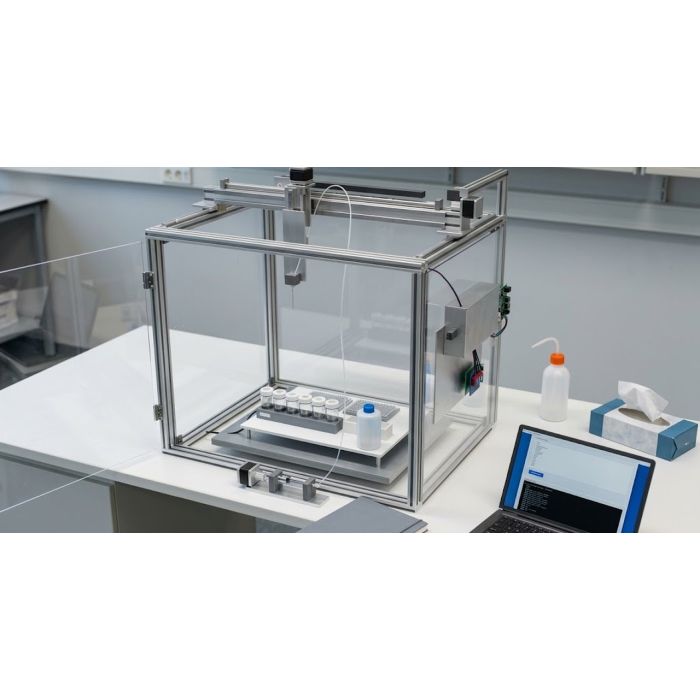
Imagine a 3D printer that, instead of plastic, measures out liquids, heats and stirs a jar, runs an oven and a microwave, and logs every step. That is the Chemical Cooker: a gantry chemistry workstation on three motorised axes with syringe-pump or peristaltic liquid handling, heated vessels with magnetic stirring, an oven chamber, positive and negative microwave applicators and an optional fume-extracted enclosure. The v2 revision adds inline NIR and Raman spectroscopy, computer-vision deck checks, an AutoPhi edge-compute card, an acoustic droplet dispenser down to one nanolitre, an inert-gas purge chamber, a dual-wavelength UV module and a signed hash-chain audit trail built to be 21 CFR Part 11-ready.
The software is the point. The Serum Build Platform is a Python stack that turns formulation data into G-code recipes the machine can run: interpreter, controller, recipe builder, simple user interface, batch production, drug database, dosage controller, formula scaler and FDA tools, gated by a serial-key subscription, with a Lite Alchemy data set of twenty-four elements, fifty synthesis methods and twenty-eight probability entries. Every recipe can be designed, validated and dry-run with no hardware; the physical build follows the blueprints when the buyer is ready. This is research tooling, not a claim about any outcome.
It is for research labs and engineering buyers who want a bench that follows a written recipe. The buyer walks away with the hardware blueprints, bill of materials, assembly steps, wiring diagrams, calibration runbooks and safety notes, the complete software and the data set. The designs and source code remain the property of the inventor, patent pending.
Valuation
Pre-production blueprint usage right, patent pending, non-exclusive. The analog this product is closest to in the market is lab automation and chemistry platforms — Thermo Fisher, Agilent, Waters Corp, and novel compound-discovery at Insilico Medicine.
Patent landscape
Lab automation IP is moderately dense; novel reaction-cooker and compound-prediction architectures are patentable.
Market opportunity
- Lab automation market: $6B (2026) → $11B (2032).
Comparable transactions
- Danaher → Pall Corp (2015): $13.8B.
- Thermo Fisher → PPD (2021): $20.9B.
Estimated valuation range
Realistic clearing band for a non-exclusive blueprint usage right: $1M (research / single-buyer evaluation) → $10M (strategic non-exclusive with manufacturing / deployment rights).
Listed catalog price: $1,964,775 — public anchor for direct enquiry; actual clearing price negotiated inside the range above with the buyer, scope (non-exclusive, territory, field-of-use), and milestone structure.
Description
Chemical Cooker — Gantry-Based Automated Chemistry Workstation & Serum Build Platform (SKU 2044)
Status: Patent pending — all rights to seek additional patent protection are expressly reserved by the inventor. All designs, specifications, source code, and intellectual property are the exclusive property of Christopher Gabriel Brown. See the enclosed LICENSE and PATENT_PORTFOLIO.md references for full legal notices.
Citation (CFF 1.2.0): Christopher Gabriel Brown, Independent Inventor, christopher@cri-one.com
Overview
The Chemical Cooker is a gantry-based automated chemistry workstation (3D-printer-style) combined with the Serum Build Platform — a run-ready, subscription-gated software system that turns formulation data into executable G-code recipes. The package ships as a complete design-and-software bundle : hardware blueprints (design specifications, bill of materials, assembly steps, wiring diagrams, calibration runbooks, safety & compliance), a full Python software stack (G-code interpreter, controller, recipe builder, Simple UI, batch production, discovery bridges, drug database, reference system, dosage controller, formula scaler, outcome foresight, FDA tools, and more), and a curated Lite Alchemy data set of 24 elements, 50 synthesis methods, and 28 probability entries gated by serial-key subscription.
The workstation provides three-axis CNC-style motion (X, Y, Z on linear rails with stepper motors), syringe-pump and peristaltic liquid handling, heated reaction vessels with magnetic stirring, a dedicated oven chamber (50–300 °C), dual-polarity microwave applicators (positive and negative modes), and an optional enclosure with fume extraction. The v2 engineering revision adds six new subsystems — inline NIR + Raman spectroscopy, pre-flight computer-vision deck validation, an AutoPhi V20 PCIe 5.0 ×8 edge-compute accelerator, an acoustic droplet dispenser (1 nL precision), an inert-atmosphere (N 2 /Ar) purge chamber, and a UV cure module (365 + 405 nm) — while upgrading the heating block to 180 °C and the audit trail to Dilithium-5 signed hash-chain records (21 CFR Part 11-ready).
The software is the focus of this offering. All recipes can be designed, generated, validated, and dry-run without any hardware . The physical build follows the documented blueprints when the buyer is ready.
Scaling option: dimensions can be increased (e.g. 800 × 600 × 500 mm) for larger vessels or more wells.
v1 Motion System (Gantry)
Version 2 (assembly tag CCL-22-ASSY-002, released April 2026) adds six new subsystems, upgrades the heating block and safety sensors, and replaces the plain-CSV audit trail with a cryptographically signed hash-chain record system. All v1 recipes run unchanged on a v2 cooker. The v2 acquisition price is $3,800,000 (vs. $2,500,000 for v1).
Subsystem Tag Name Key Parameters
SPEC-001 Inline NIR + Raman Spectroscopy NIR 900–2,500 nm (InGaAs, 256 px, 10 nm resolution); Raman 785 nm laser 100 mW, 150–2,000 cm −1 ; integration 10 ms–60 s; 24 V / 35 W; sapphire window; USB 3.2; G-code N , R
CV-001 Pre-Flight Vision Sony IMX662, 3840 × 2160 @ 30 fps; 6 mm M12 lens, ≤ 2% TV distortion; 120 LED ring 5000 K; BlackWalk-12 model on EDGE-001; pre-flight V
EDGE-001 AutoPhi V20 PCIe 5.0 ×8 Accelerator (Zenith) PCIe 5.0 ×8 FHHL; 32 GT/s × 8 = 256 GT/s; 48–65 W; ≥ 1,200 inf/s; Python / C / gRPC API
DISP-003 Acoustic Droplet Dispenser (tool T3) 1 nL–1 μL per pulse; up to 500 Hz; ± 30 μm positional; 384/1536-well reservoir
ATM-001 Inert Atmosphere Chamber N 2 (default) or Ar; O 2 I1 / I0
UV-001 UV Cure Module (tool T4) 365 nm (UVA) + 405 nm (near-UV); 5 W optical per wavelength; 25 mm focal spot; 24 V / 18 W; G-code U , ,
HEAT-002 Upgraded Heating Block Ambient to 180 °C; 0.1 °C resolution; 2 °C/s ramp (heat), 0.5 °C/s (cool); dual PT100; safety cutoff 195 °C; aluminium 6061 anodised
SAFE-002 Added Safety Sensors VOC detector, spill sensor, UV interlock, inert-gas flow sensor
AUDIT-001 GMP Audit Trail (Dilithium-5) Hash-chained JSONL; SHA-256 per entry; Dilithium-5 device + operator signatures; TPM-backed keystore; 21 CFR Part 11-ready; .ccab export bundles
v2 Electrical Budget
Spectroscopy decision codes returned by EDGE-001: 0x00 OK (advance), 0x01 CONTINUE (re-read after wait), 0x02 PAUSE (operator review), 0x03 ABORT (GMP abort record).
Lite elements, methods_lite, probabilities_lite recipe_builder, gcode_export, local_only 50
Pro elements, methods_lite, probabilities_lite, methods_extended recipe_builder, gcode_export, batch_export, optional_api 500
Authentication options: (1) Lifetime card — paper card with unique code (e.g. SBP-LITE-XXXXX-XXXXX-XXXXX) entered once, locked to that installation; (2) User ID + password backed by users.json on the disc; (3) Serial key in config.json . Priority: activation file → config serial key / user+password → prompt.
Lite Alchemy Data Set
The curated Lite Alchemy data set (gated by subscription) contains 24 elements , 50 synthesis methods (M001–M052), and 28 probability entries .
24 Elements
C-H-O-N-Zn Reagent A (amino acid / C-H-O-N carrier) 0.5 mL + Reagent B (zinc solution) 0.3 mL + Carrier/buffer 0.2 mL
C-H-O-N Reagent A (C-H-O-N) 0.6 mL + Carrier/buffer 0.4 mL
C-H-O-N-S Reagent A (C-H-O-N) 0.45 mL + Reagent B (S source) 0.35 mL + Carrier/buffer 0.2 mL
C-H-O-N-P Reagent A (C-H-O-N) 0.5 mL + Reagent B (P source) 0.3 mL + Carrier/buffer 0.2 mL
C-H-O-N-Mg Reagent A (C-H-O-N) 0.55 mL + Reagent B (Mg solution) 0.25 mL + Carrier/buffer 0.2 mL
serum_recipe reservoir_1 0.5 mL + well_1 (combine) 0.3 mL + Carrier 0.2 mL
Diabetes Project 13 C-H-O-N-Zn Beta-cell regeneration, insulin regeneration, glucose metabolism 14
Alzheimer’s Project 14 C-H-O-N Neuroinflammation, BDNF, synaptic function, neuronal regeneration, tau/amyloid 14
Parkinson’s Project 15 C-H-O-N Dopamine synthesis, dopamine neuron regeneration, neuroinflammation 29
Each bridge script reads the corresponding project’s findings/*_discoveries.json , maps the selected compound to a formulation (elements, heat from synthesis_methods or literature values, stir, wait), builds recipe steps, converts to G-code, writes recipe JSON + G-code files, and appends one row to the royalty audit CSV — all crash-hardened with safe_write (flush + fsync) and recovery files. No subscription required for bridge scripts.
Drug Database & PubChem Integration
The drug data downloader ( software/drug_data_downloader.py ) retrieves pharmaceutical data from the PubChem REST API (rate limit: 5 requests/second), parses molecular formulas into element lists, and saves results as JSON. The aspirin recipe generator produces complete pill recipes from PubChem data — e.g. aspirin (CID 2244, C 9 H 8 O 4 , MW 180.16 g/mol): 100 pills × 325 mg = 32,500 mg active + 5,700 mg excipients = 38,200 mg total.
Disease Research Database
300 diseases across 12 categories have been imported from Project 16 disease-mechanism research into software/disease_research/disease_database.json . Categories: Infectious (50), Cardiovascular (25), Respiratory (25), Gastrointestinal (25), Endocrine (25), Neurological (25), Musculoskeletal (25), Dermatological (25), Hematologic (25), Psychiatric (25), Renal (15), Hepatic (10). For each disease: name, number, category, primary compound, molecular formula, molecular weight, elements, target concentration, and final volume are extracted.
Universal Hose Adapter System
A 3D-printer-style element-drum system featuring 24 element drums (50 L capacity each) in a 4 × 6 grid, syphon assemblies (2 m hoses, 6 mm diameter, 100 mL/min default flow), a universal adapter with 24 input ports and a 500 mL mixing chamber (2 mm output nozzle), and a large-format bed in 12″ (304.8 × 304.8 mm, ~2.5 L max) or 24″ (609.6 × 609.6 mm, ~5 L max) sizes with 1 mm positioning resolution and heating up to 200 °C.
Tower Recycle Center
Conceptual design for an advanced multi-story recycling facility: 150–200 m height (50–65 stories), 30–40 m base diameter tapering to 25 m, reinforced concrete with steel framework. 700–1,200 m² floor area per level. Processing capacity: 1,000–5,000 tons/day, continuous 24/7, energy generation 5–20 MW. Provides purified elements, water, and power to the Chemical Cooker.
Reference System
Comprehensive pharmaceutical reference management with three components: reference manager ( software/reference_manager.py ) for search, add, import/export, and statistics; reference updater ( software/reference_updater.py ) for automatic PubMed (E-utilities, 3 req/s), FDA, and standard reference downloads; and reference integration ( software/reference_integration.py ) for linking references to drugs and recipes. Standard references included: Goodman & Gilman’s (2023), Remington (2021), USP-NF, FDA Orange Book, Martindale (2023). Database: software/references/references_database.json .
Dosage Controller
Defines intake pills by mg (milligrams) and μg (micrograms) per pill. Direct specification ( --mg 25 --ug 50 --pills 30 ) or derivation from serum batch ( --from-serum ). Outputs table and label suitable for printing on cards or bottles. CSV export available.
Percentage & Outcome Foresight
Percentage utilities: Convert between percent w/v and mg/mL (1% = 10 mg/mL); composition percent to ratios.
Outcome foresight: Given volume, concentration (% or mg/mL), and pill count, projects total mg, mg per pill, and an optional success band from Lite Alchemy probability data when elements are provided. Example: 10 mL at 5% w/v, 50 pills, elements C,H,O,N,Zn → 500 mg total, 10 mg/pill, method probability 88%.
Formula Scale
Answers “for X mL of serum, how much of each component?” using named base formulas from software/formulas/base_formulas.json . Scale factor = target_volume_ml / base_volume_ml. CLI: python software/formula_scale.py --formula C-H-O-N-Zn --target-ml 10 . Also scales recipe volumes_ul arrays for batch sizing.
Batch Production (Unattended)
Run-list CSV (columns: source , compound_or_formula_id , target_ml ) drives automated generation of recipe + G-code for every row. Discovery rows call the appropriate bridge script; formula rows use the formula scaler. Optional --run flag executes each G-code in sequence via the cooker controller. Schedulable via cron or Windows Task Scheduler for fully unattended operation.
Royalty Audit
Each use of a discovery bridge or the platform appends one row to audit/royalties_by_use.csv . Columns: timestamp_utc , source , compound_or_recipe , serial_key (masked), royalty_units , notes . Written before recipe/G-code files; flushed and fsync’d. Used for royalty computation: royalty_due = SUM(royalty_units) × rate_per_unit.
Crash Hardening & Recovery
All critical file writes use safe_write.write_text_flush() (write → flush → fsync). On exception, recovery files are written: last_diabetes_recovery.json/.gcode , last_alzheimers_recovery.json/.gcode , last_parkinsons_recovery.json/.gcode , last_platform_recovery.gcode . The recipe builder NameError (undefined oven_c , mw_neg , mw_pos ) has been fixed. Order: audit first → write with flush → recovery on exception.
Core G-code interpreter and controller logic require no external dependencies (stdlib only). The platform app ( platform/app/ ) also uses stdlib only for its core validate/recipe/main flow.
G-code Interpreter Software Detail
The interpreter ( software/gcode_interpreter.py ) defines 15 command types via the CommandType enum: MOVE , RAPID , HOME , DISPENSE , TOOL , HEAT , OVEN , MICROWAVE_POS , MICROWAVE_NEG , STIR , WAIT , PAUSE , ABSOLUTE , RELATIVE , COMMENT , END . Each parsed line yields a ParsedCommand dataclass with typed fields: x , y , z , f (floats); d (μL); t (tool int); h (°C); o (oven °C); mw_power (W); mw_time (s); s (stir 0/1); w (wait s); raw (original line). Exposed via generators parse_gcode_file() and parse_gcode_string() .
Wiring Diagram Summary
Power path: AC mains → GFCI outlet → 24 V DC PSU (5–10 A) → fuse 10 A → CNC HAT / RAMPS (motor power). Buck 24 → 5 V (3 A) → fuse 2 A → Pi / Arduino (logic). Heater: AC mains → fuse 5 A → SSR (gate driven by 5 V via ~220 Ω) → heating block. E-stop: NC contact in series with 24 V to drivers. All logic GND tied together. Keep stepper wires away from thermistor/endstop wires to reduce noise. Use cable chains or clips for X/Y/Z cable routing.
Safety & Compliance
Covers ventilation (fume hood or ducted exhaust for volatile/toxic use), containment (drip tray, secondary containment, spill kits), electrical safety (fused DC/AC; SSR with grounded plug; GFCI near wet areas; no exposed AC on deck), mechanical safety (guards, E-stop, temperature limits in software), and chemical compatibility (PTFE/FEP/PharMed tubing; borosilicate/PTFE vessels). Home-lab and professional/institutional guidance included. Compliance checklist provided. v2 adds VOC detector, spill sensor, UV interlock, and inert-gas flow sensor.
Steps per mm (motion) Command known move (e.g. G91 G1 X50 F300); measure with caliper; adjust scale factor 1 mm commanded = 1 mm actual
Dispense volume (μL/step) Prime with water; command D1000; collect in graduated tube or weigh (1 g ≈ 1 mL); linear fit D1000 = 1,000 μL
Temperature Set H60; PID tune; verify with separate thermometer; correct offset Setpoint ± offset
Home position Run G28; mark tip on deck; re-run and confirm repeatability Repeatable origin at (0,0,0)
CV deck registration (v2) Calibration tile at P0; EDGE-001 stores pixel-to-mm transform ± 0.5 mm alignment P1–P12
Large-Manufacturer Positioning
The platform supports pharma / animal-health scale use: batch production from run-list CSV, use-by-use royalty audit, formula scaling with percentage (w/v) and outcome foresight, dosage controller (mg/μg per pill), controlled distribution via lifetime card or user ID + password on Blu-ray disc, legal foundation (patents, compliance, user responsibility), and crash-hardened writes with recovery. Extensions: batch-record export (PDF/CSV for GMP), multi-site deployment, machine binding, and online activation.
FDA Application Tools
The package includes FDA-related tooling: software/fda_application_generator.py , software/fda_application_helper.py , software/fda_response_generator.py , software/fda_form_platform.py , software/fda_download_server.py , and software/automated_fda_maker.py . These assist with generating FDA application documentation, form creation, and response handling for regulatory submissions.
Blu-ray Package Builder
build_bluray.py creates a complete distributable package embedding Alchemy data, the drug database, user-authentication system, and launcher scripts for Windows/Linux. The package is AES-256 encrypted on disc; passphrase sent separately by email. build_aspirin_workflow.py provides an automated end-to-end workflow: download drug data → build Blu-ray package → generate aspirin recipe.
Simple UI (Web Interface)
Flask-based web UI at http://127.0.0.1:5000 with three tabs: (1) G-code dry-run — upload or paste G-code, click Run, view output; (2) Formula scale — pick formula and target mL, get BOM; (3) Batch run — upload run-list CSV, run batch production. Start with python software/simple_ui.py or start_simple_ui.bat . No subscription required.
sales-pitches/chemical-cooker26_VAULT_DELIVERY_INSTRUCTIONS.html Vault delivery instructions
This package ships on a single Blu-ray disc, posted to the delivery address on your order. The archive on the disc is AES-256 encrypted; the passphrase is sent separately, by email, once the disc is despatched — so the disc alone is of no use to anyone who intercepts it.
Discs are despatched by tracked, signed-for post. Allow 5 business days for mastering and verification before despatch.
© 2026 Christopher Gabriel Brown
Footnotes
- Product number 8463.
- Family: chemistry lab.
- Purchase: When you buy, you buy the use of that blueprint only.
-
 Brain Chemistry
A patent-pending seven-compound brain formulation, fully documented.
Special Price $242,250,000.00 Regular Price $969,000,000.00 -
 Semiconductor Material Discovery
2,000 semiconductor material combinations, ranked for testing.
Special Price $362,500,000.00 Regular Price $1,450,000,000.00 -
 Alchemy Data Three
The third-generation compound research engine and its patent draft.
Special Price $72,750,000.00 Regular Price $291,000,000.00 -
 Alchemy Probability Data
Element-combination odds and reaction methods, fully offline.
Special Price $60,500,000.00 Regular Price $242,000,000.00
-
 Diabetes Research Notes Discovery
Computational diabetes leads, ready for a lab to test.
Special Price $245,596.88 Regular Price $982,387.50 -
 Quantum Battery
The quantum battery power chip, packaged for the foundry.
Special Price $302,500,000.00 Regular Price $1,210,000,000.00